
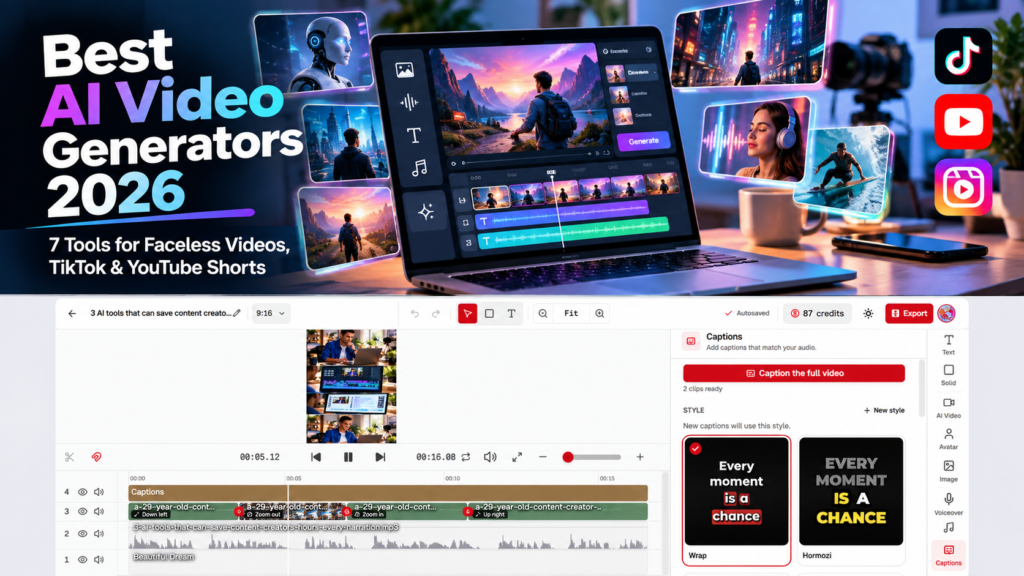
AI video tools have moved well beyond simple text-to-video demos. In 2026, the better platforms can write scripts, generate visuals, add realistic voiceovers, create captions, build avatars, and turn a single prompt into a publishable video.
The harder question is choosing the right workflow.
A creator building faceless YouTube Shorts needs something very different from a marketer making avatar-led ads or a filmmaker generating cinematic AI clips.
We compared seven of the best AI video generators in 2026 based on workflow, video quality, automation, editing flexibility, pricing, and how well each tool fits faceless videos, TikTok, and YouTube Shorts.
For creators specifically looking for a faceless AI video generator, the most important factors are workflow speed, editing control, voice quality, caption support, and how easily the tool can turn an idea into a complete short-form video. If your priority is an AI video generator for YouTube Shorts or TikTok, automation and vertical 9:16 support matter more than cinematic clip quality alone.
Disclosure: Vyneta may earn a commission when you purchase through some links on this page. We independently research every product. We only describe a tool as hands-on tested when we have actually used it.
Table of Contents
Best AI Video Generators 2026: Quick Comparison
| Tool | Best For | Free Option | Starting Paid Price* | Main Trade-Off |
|---|---|---|---|---|
| AITuber | Faceless video automation | Yes | $39/mo | Best features and downloads require a paid plan |
| AutoShort | Automated TikTok & YouTube Shorts | Yes | ~$29/mo currently | More specialized than a full video editor |
| Fliki | Voice-heavy text-to-video workflows | Yes | $28/mo | Premium AI video generation consumes more credits |
| InVideo AI | Prompt-to-video and AI ad workflows | Limited free use | $20/mo annual | Advanced generation can become credit-intensive |
| HeyGen | AI avatars and localization | Yes | $29/mo | Less focused on automated faceless channels |
| Pictory | Turning scripts and existing content into videos | 14-day trial | $29/mo | More repurposing/stock-oriented than cinematic generation |
| Runway | High-quality generative AI video clips | Yes | $15/mo | Not an end-to-end faceless publishing workflow |
*Prices checked September 25, 2026 and can change. Current information comes from each vendor’s official pricing documentation.
1. AITuber — Best for Automated Faceless Video Workflows
AITuber is one of the more interesting options for creators who want to turn an idea into a complete faceless video instead of generating individual AI clips and assembling everything manually.
If your main goal is finding a faceless AI video generator for repeatable Shorts, TikTok, or narrated content, AITuber is one of the strongest fits in this list because it focuses on the full workflow rather than isolated video clips.
Its Faceless Video workflow can start from either an idea or a finished script. AITuber can then generate the voiceover, visuals, captions, music, and scene structure. It supports vertical 9:16 output for TikTok, Reels, and YouTube Shorts, as well as 16:9 videos for regular YouTube.
Our hands-on AITuber test
Vyneta tested AITuber using a free account.
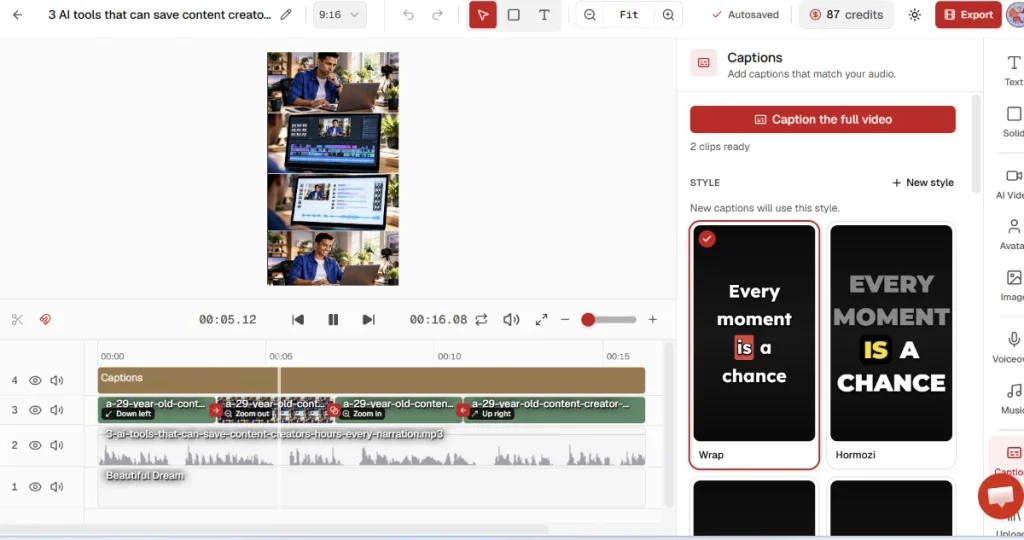
We asked it to create a short vertical video about AI tools for content creators. Using Moving AI Images at Basic quality, AITuber produced a roughly 16-second, five-scene video from one prompt.
The generation cost 13 credits out of the initial 100 free credits.
The generated project contained separate timeline layers for visuals, narration, background music, and captions. We could open the project in AITuber’s editor and work with those elements individually.
That is an important distinction: AITuber does not simply return a single flattened AI video.
Our first result was usable as a draft, but the visual direction was somewhat repetitive. Several scenes used a similar content-creator-at-a-laptop composition. That means creators should expect to review and occasionally regenerate or replace scenes instead of treating every first output as publication-ready.
For a deeper look at our hands-on test, pricing, credits, strengths, and limitations, read our AITuber Review 2026.
AITuber‘s documentation confirms that visuals, captions, and audio can be modified after generation, although the original generated script itself cannot simply be rewritten inside the finished faceless project.
AITuber’s credit system
Faceless videos can use Moving AI Images, stock video, or full AI video clips.
Basic AI images cost one credit per scene, while higher-quality images cost more. AI video clips are considerably more expensive and require an active paid plan. AITuber also charges for AI voiceover based on duration.
New accounts receive 100 signup credits and can earn additional one-time credits by completing onboarding actions.
Paid plans currently start with Creator at $39 per month for 2,500 monthly credits, followed by Pro at $69 and higher-volume plans (AITuber).
Who should choose AITuber?
AITuber makes the most sense if your goal is consistent faceless content rather than isolated cinematic clips.
It is particularly relevant for creators publishing Shorts, TikToks, Reels, list videos, narrated stories, educational content, or faceless YouTube channels.
If that describes your workflow and start with the free credits before deciding whether the paid workflow is worth it.
2. AutoShort — Best for High-Volume Shorts Automation
AutoShort is much more specialized.
Rather than trying to be a general-purpose AI film studio, it focuses heavily on automated short-form video production for TikTok and YouTube Shorts.
The workflow includes scripting, video generation, word-by-word captions, scheduling, API access, and direct posting to supported social platforms. The free plan currently includes 100 monthly credits and roughly two standard videos (AutoShort).
Paid tiers significantly increase output. The current pricing page lists plans designed for roughly 45, 100, 250, and up to 750 videos per month depending on tier (AutoShort).
That makes AutoShort attractive for users whose priority is publishing volume rather than detailed creative control.
Explore AutoShort if your workflow is primarily automated Shorts or TikTok content.
3. Fliki — Best for AI Voices and All-in-One Text-to-Video
Fliki combines text-to-video, AI voiceovers, stock content, generative images, AI video clips, avatars, captions, translation, and social publishing.
Its biggest differentiator is voice.
The current platform advertises more than 2,000 voices on its Premium tier and support for 80+ languages, while the free plan lets new users experiment without entering a credit card (Fliki).
Fliki can create videos from ideas, scripts, blog posts, and presentations. It can also incorporate models such as Veo, Kling, and Seedance for generated video assets, depending on the plan.
Standard currently costs $28 per month, while Premium is $88 per month (Fliki).
The main consideration is credit usage. Stock footage is inexpensive from a credit perspective, while higher-end AI-generated video clips can consume credits much faster depending on model and resolution (Fliki).
See Fliki if natural voice choice, multilingual content, and flexible text-to-video workflows matter more than fully automated channel management.
4. InVideo AI — Best for Agentic Video Creation and AI Ads
InVideo AI has evolved into a broad AI production environment rather than a basic template editor.
Its current plans combine an AI creation system with a full timeline editor, stock footage, generative models, collaborative editing, and higher-end video models such as Seedance on eligible plans ( invideo).
The Starter plan currently begins at $20 per month when billed annually with 400 credits. Plus and Max increase both monthly credits and access to more advanced models and agents ( invideo).
InVideo is particularly interesting for advertising workflows. The company now documents AI-driven UGC and ad-production workflows rather than limiting the product to simple social videos.
The downside is cost predictability. A sophisticated video can invoke multiple models and consume substantially more credits than a simple faceless video built from stock assets.
Explore InVideo AI if you want a broader AI video production environment rather than a narrowly focused Shorts generator.
5. HeyGen — Best for AI Avatars and Localization
HeyGen is the strongest fit in this comparison when the video needs a person-like presenter rather than a faceless narration workflow.
Its free plan currently supports three videos per month up to one minute each. Creator costs $29 per month and includes 600 credits, 1080p exports, voice cloning, and support for more than 175 languages and dialects. Pro begins at $49 and adds 4K output and more monthly credits (HeyGen).
HeyGen is especially useful for spokesperson videos, localized marketing, product explainers, sales videos, and training content.
Its Business offering also integrates with tools including n8n, Make, HubSpot, and Zapier (HeyGen).
For pure faceless TikTok automation, however, AITuber or AutoShort is a more natural fit.
See HeyGen pricing if avatars, digital presenters, or multilingual localization are central to your use case.
6. Pictory — Best for Repurposing Existing Content
Pictory is strongest when you already have content.
It can turn scripts, URLs, presentations, and recorded material into videos, pair scenes with stock footage, generate voiceovers, add subtitles, and summarize longer content.
The Starter plan currently costs $29 per month on monthly billing, or about $25 per month on its annual offer. Professional costs $59 monthly and adds more video capacity, Getty assets, custom avatars, voice cloning, and advanced AI features (Pictory.ai)
Pictory also includes large stock libraries from providers such as Storyblocks and Getty depending on the plan (Pictory.ai).
That makes it particularly useful for bloggers, educators, marketers, podcasters, and businesses repurposing existing written or recorded content.
It is less compelling if your priority is creating highly cinematic original AI footage from scratch.
Explore Pictory if content repurposing is more important than pure generative video.
7. Runway — Best for High-End Generative AI Video Clips
Runway approaches the problem from the opposite direction.
It is primarily a generative visual platform rather than a faceless-content automation system.
Runway currently gives free users 125 one-time credits. Standard costs $15 per month on monthly billing or $12 with annual billing, while Pro and Max provide much larger credit allocations.
Its current model selection includes Runway’s own Gen-4.5 alongside other image and video models, and the platform is built around generation, editing, visual control, and creative iteration (Runway).
That makes Runway the better choice if the quality of an individual AI-generated shot matters more than automating an entire script-to-publish workflow.
The trade-off is that you will usually need a separate process for scriptwriting, narration, captions, music, editing, and distribution.
Explore Runway if creative visual generation is the priority.
Which AI Video Generator Should You Choose?
There is no single best AI video generator for every creator.
For a faceless content workflow, AITuber currently offers one of the clearest prompt-to-finished-video processes we examined. Our own micro-test confirmed that a single idea can be converted into scenes, narration, music, captions, and an editable timeline without starting from a paid subscription.
For creators trying to automate large quantities of TikTok or YouTube Shorts, AutoShort is more specialized.
Fliki is particularly compelling when voice quality and multilingual production matter. InVideo AI offers a broader production environment for creators and advertisers. HeyGen remains a stronger fit for avatar-led content, while Pictory is better for repurposing existing material.
Runway belongs in a different category: choose it when the quality and control of individual generative shots matter more than full workflow automation.
| Your Main Goal | Best Starting Point |
|---|---|
| Faceless YouTube/TikTok workflow | AITuber |
| High-volume automated Shorts | AutoShort |
| Voice-heavy or multilingual video | Fliki |
| Full AI production and ad creation | InVideo AI |
| Avatar-led or localized video | HeyGen |
| Blog/script/content repurposing | Pictory |
| Cinematic generative video clips | Runway |
Before choosing a subscription, test one realistic video workflow. Our free Faceless Video Starter Kit helps you plan a short script, map the scenes and record generation costs and editing time. Use the same brief across your shortlisted tools to compare the effort required to produce one publishable video.
Is AITuber Worth Trying?
For faceless-video creators, yes — especially because the free credits are enough to evaluate the basic workflow before paying.
Our first-generation result was not perfect. The scene selection was visually repetitive, and we would edit some of the visuals before publishing.
But the broader workflow worked as advertised: an idea became a vertical narrated video with generated visuals, music, captions, and an editable multi-layer timeline.
That is enough for us to consider AITuber a serious option for creators who value automation.
Try AITuber with the free credits → before upgrading to a paid plan.
FAQ
What is the best AI video generator for faceless videos?
AITuber and AutoShort are two of the most purpose-built options in this comparison. AITuber offers more flexible faceless workflows and editing, while AutoShort focuses more heavily on repeatable TikTok and YouTube Shorts production.
What is the best AI video generator for TikTok?
For automated TikTok creation, AutoShort and AITuber are both strong candidates. Fliki is another option when voice choice and multilingual production are priorities.
What is the best AI video generator for YouTube Shorts?
For creators looking for an AI video generator for YouTube Shorts, AITuber is one of the strongest all-in-one options in this comparison because it combines 9:16 faceless video creation, AI visuals, narration, captions, music, and editing in one workflow. AutoShort is more specialized for repeatable Shorts production and automated publishing, while AITuber gives you more control over the full creation process.
Can I use an AI video generator for free?
Yes. AITuber provides initial free credits, AutoShort has a free tier, Fliki offers a free plan, HeyGen provides three free videos per month, and Runway includes one-time free credits. The limitations vary significantly by platform.
Which AI video tool is best for avatars?
HeyGen is the most avatar-focused choice in this comparison. Synthesia is another major avatar platform, but for this shortlist we prioritized tools more closely aligned with faceless videos, TikTok, and YouTube Shorts.
Which AI video generator produces the best cinematic footage?
Runway is the strongest choice in this list when raw generative video quality and creative shot control are more important than end-to-end publishing automation.
How We Evaluated These Tools
This comparison was updated in September 2026. We checked current official feature documentation and pricing for every platform.
AITuber was additionally tested hands-on by Vyneta using its free plan. We created a short faceless vertical video from a prompt and examined the resulting generation workflow and editor.
We have not hands-on tested every product in this comparison, and we do not present vendor documentation as personal testing.
You can find more independent software research in Vyneta Reviews.