
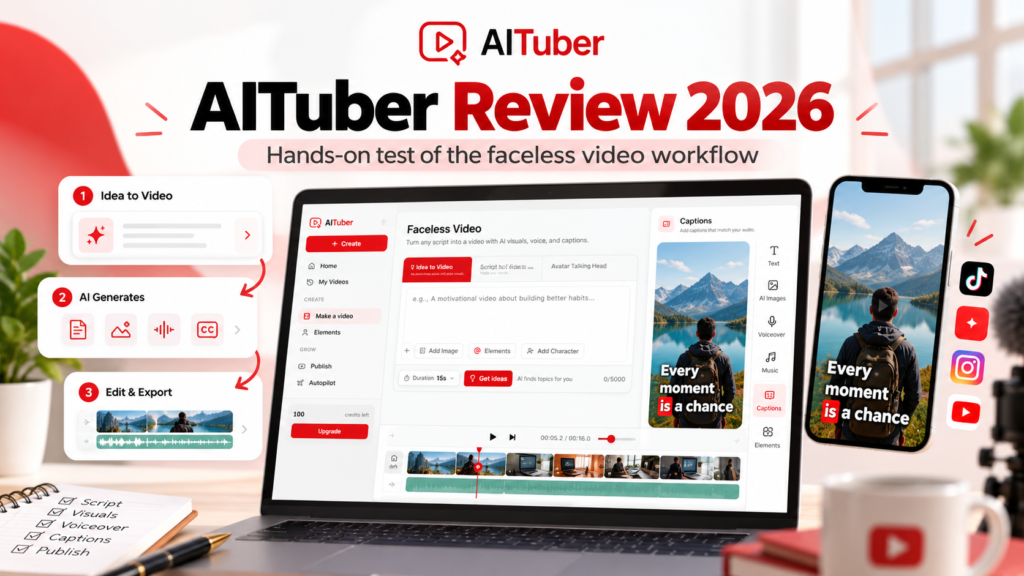
Creating faceless videos used to mean combining several tools for scripts, voiceovers, visuals, captions, music, and editing.
AITuber tries to compress that workflow into one platform.
In this AITuber review, we look at how the platform works, what it costs, where it performs well, where it still needs improvement, and what happened when we tested its faceless video workflow ourselves.
Disclosure: Vyneta may earn a commission if you purchase AITuber through links on this page. We tested AITuber using a free account and only describe features we actually used as hands-on experience.
Free credits let you test video generation and editing. Downloading a finished video requires an account that has paid for a plan at least once.
Table of Contents
AITuber Review: Quick Verdict
AITuber is most interesting for creators who want to produce faceless TikTok videos, YouTube Shorts, Reels, or narrated YouTube content without manually assembling every part of the workflow.
Its core strength is automation.
You can start with an idea or script, select a visual style, voice, captions, music, and aspect ratio, and let AITuber build the first version of the video.
In our test, the workflow worked.
AITuber generated a roughly 16-second vertical faceless video with five scenes, narration, background music, captions, and editable visual layers from a single prompt.
The first result was not perfect. Some visuals were repetitive, and we would still edit the project before publishing.
That makes AITuber better viewed as a fast first-draft video production system than a one-click guarantee of publication-ready content.
AITuber at a Glance
| Category | Details |
|---|---|
| Best for | Faceless videos, Shorts, TikTok, Reels, automated video workflows |
| Free access | Yes |
| Signup credits | 100 credits |
| Additional onboarding credits | Up to 65 more |
| Paid plans | From $39/month |
| AI voices | 1,300+ |
| Video formats | 9:16 and 16:9 |
| AI video clips | Available on paid plans |
| Download | Requires account to have had a paid plan |
| Autopilot | Available on paid plans |
| Affiliate commission | 30% recurring lifetime |
| Our test | Yes — free account |
AITuber officially gives new users 100 signup credits and lets them earn another 65 by completing onboarding steps, for up to 165 initial credits. Unused credits do not expire. AITuber
What Is AITuber?
AITuber is an AI video creation platform built around automating the process from idea to finished video.
Its faceless workflow can generate:
- scripts
- AI voiceovers
- visuals
- captions
- background music
- scene structure
The platform supports vertical 9:16 videos for Shorts, TikTok, and Reels, as well as 16:9 videos for standard YouTube content. AITuber
AITuber also includes additional tools such as avatar videos, AI music videos, article-to-video, PDF-to-video, AI clips, viral templates, and automated publishing workflows.
For creators comparing several platforms, see our Best AI Video Generators 2026 comparison.
Our Hands-On AITuber Test
We tested AITuber using its free plan.
Our goal was simple: see whether someone could give AITuber an idea and get a usable faceless video draft without first learning a complicated editor.
We used this general concept:
Three AI tools that can save content creators time every week.
We selected:
- Idea to Video
- Moving AI Images
- Basic image quality
- Vertical 9:16
- AI voice
- automatic background music
- captions
- approximately 15 seconds
AITuber estimated the generation at 13 credits.
After generation, the finished project was about 16 seconds long and contained five visual scenes.
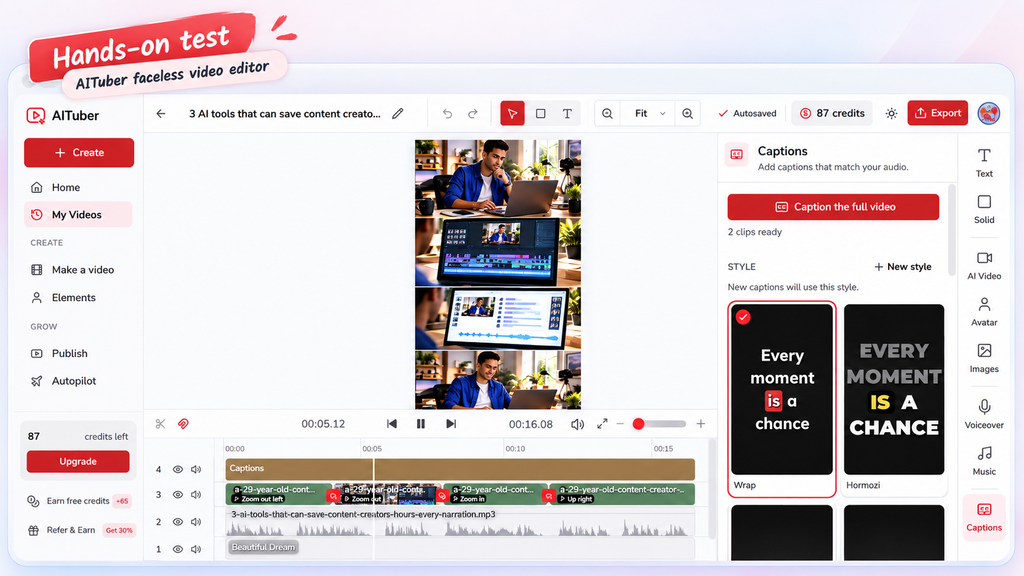
What AITuber generated
The resulting project included:
- AI-generated visuals
- a narration audio track
- background music
- captions
- multiple scenes
- an editable timeline
The editor separated those elements into different layers.
That matters because the generated video was not simply a single locked output. We could open the project and work with the visual clips, narration, music, and captions separately.
What worked well
The workflow itself was fast and easy to understand.
We did not have to create five scenes manually, generate a voiceover somewhere else, import music, and then synchronize everything inside another editor.
AITuber handled the initial assembly.
For a creator producing frequent short-form content, that can remove a meaningful amount of repetitive work.
What could be better
Our first-generation visuals were somewhat repetitive.
Several scenes used variations of a similar “content creator working at a laptop” composition.
They were relevant to the subject, but the visual storytelling was not diverse enough that we would publish the video without changes.
This is an important limitation.
AITuber can accelerate creation, but creators should still review the output and replace weak or repetitive scenes.
AITuber Faceless Video Workflow
AITuber’s main faceless workflow accepts either an idea or a finished script.
From there, users choose among three main visual approaches:
Moving AI Images
AITuber creates AI images for scenes and adds movement.
AI Video
The system generates actual AI video clips for scenes.
Stock Video
AITuber matches scenes with stock footage.
Free accounts can use Moving AI Images and Stock Video. AI Video requires an active paid plan. AITuber
For creators who mainly need narrated Shorts, list videos, stories, explainers, or educational content, Moving AI Images can be the inexpensive starting point.
Want to test your own video workflow? Use our free Faceless Video Starter Kit to plan a script, map scenes and record the editing effort and cost of one usable video. No software purchase or affiliate signup is required.
How AITuber Credits Work
AITuber uses credits rather than an unlimited-generation model.
Every video consumes credits based mainly on:
- voice duration
- visual type
- visual quality
- number of scenes
For faceless videos, Basic AI images cost only one credit per scene. Higher-quality image tiers cost more, while AI video clips can cost substantially more per second. AITuber
The platform shows the estimated generation cost before you click Generate.
That was useful during our test because we knew the 15-second video would cost 13 credits before committing.
Free credits
New accounts currently receive:
- 100 signup credits
- 25 credits for creating the first video
- 15 credits for connecting a channel
- 25 credits for setting up Autopilot
That means a new user can earn up to 165 free credits before purchasing anything. AITuber
However, free credits do not unlock every feature.
AI Video requires an active paid plan, and downloading a finished video requires the account to have had a paid plan at least once. AITuber
This is one of the biggest restrictions of the free experience.
AITuber Pricing in 2026
AITuber currently offers several tiers.
| Plan | Monthly Price | Monthly Credits |
|---|---|---|
| Creator | $39 | 2,500 |
| Pro | $69 | 5,000 |
| Studio | $129 | 10,000 |
| Agency | $249 | 20,000 |
| Business | $449 | 40,000 |
| Scale | $749 | 70,000 |
| Enterprise | $999 | 100,000 |
AITuber says all plans include its creation features, with the main differences being credits, scale, team access, and the number of channels supported by Autopilot. AITuber
For most individual creators, Creator or Pro is the logical place to begin.
A creator running several channels or generating large volumes of AI video may need Studio or higher.
AITuber Creator Plan
Creator costs $39 per month and currently includes 2,500 monthly credits.
AITuber estimates that allocation at roughly 71 short videos per month, although actual output depends heavily on the visual type and quality settings used. AITuber
Creators using Basic Moving AI Images can stretch their credits significantly further than creators generating full AI video clips.
That makes the plan potentially economical for faceless content built from AI images, stock footage, narration, and captions.
AITuber Pro Plan
Pro costs $69 per month and doubles the credit allocation to 5,000.
It also supports more Autopilot channels and team features than Creator. AITuber
This tier makes more sense for creators producing content frequently or running multiple channels.
AI Video Models
AITuber also provides access to individual AI video clip generation.
Its model selector currently includes model families such as Veo, Kling, Seedance, and Grok Imagine, although AITuber notes that the in-app model picker is the authoritative source because models change frequently. AITuber
These clips cost considerably more credits than Moving AI Images.
So creators should distinguish between:
faceless video automation, which can be relatively inexpensive,
and
premium generative AI video, which can consume credits rapidly.
Voiceovers
AITuber advertises more than 1,300 AI voices plus voice cloning on paid plans. AITuber
In the faceless workflow, users can select and preview a voice before generating.
AITuber charges voice usage according to speech duration, currently at 30 credits per minute for relevant video types. AITuber
For channels publishing narrated stories, educational videos, list content, or explainers, the built-in voice workflow can eliminate the need for a separate text-to-speech platform.
Captions
AITuber can automatically generate captions matching the spoken audio.
Inside the editor, users can choose caption styles and work with captions separately from other media layers.
This is particularly useful for short-form platforms where many viewers initially watch without sound.
Our test confirmed that captions are represented as their own timeline layer rather than being permanently embedded into the generated visuals.
Editing
AITuber’s editor was one of the more useful parts of our test.
The generated project opened into a timeline containing separate layers for:
- captions
- visuals
- narration
- music
The editor also exposed tools for text, images, AI video, avatars, voiceovers, music, and captions.
This makes AITuber more flexible than a simple “prompt in, MP4 out” generator.
However, it is still an AI-first workflow rather than a replacement for a professional editor such as Premiere Pro or DaVinci Resolve.
Autopilot
AITuber’s Autopilot feature is built for creators who want the platform to create and publish content repeatedly.
Paid plans support direct publishing, and higher tiers increase the number of channels that can run on Autopilot. AITuber
This feature is potentially useful for:
- faceless YouTube channels
- Shorts channels
- TikTok accounts
- Reels publishing
- multi-channel content operations
But automation increases the importance of quality control.
Automatically publishing mediocre AI content faster is not necessarily a benefit.
Creators should first establish a prompt, visual style, and quality level that consistently produces acceptable results.
AITuber Pros and Cons
Pros
Fast idea-to-video workflow
The platform can turn a short prompt into an assembled video with narration, visuals, music, and captions.
Good fit for faceless content
The product is clearly designed around faceless YouTube, TikTok, Shorts, Reels, and narrated content.
Low-cost basic generation
Moving AI Images at Basic quality can use very few credits per scene.
Editable projects
Generated videos can be opened as multi-layer projects rather than locked outputs.
Multiple creation workflows
Faceless video is only one component; the platform also includes AI clips, avatars, music video workflows, article/PDF conversion, and other tools.
Large voice library
Paid plans currently advertise 1,300+ voices plus voice cloning.
Cons
Free users cannot download
The free credits are useful for evaluating generation, but downloads require the account to have had a paid plan. AITuber
AI Video requires a paid plan
The more visually dynamic AI video mode is unavailable on a purely free account. AITuber
First-generation visuals may need editing
Our own test produced relevant but repetitive scenes.
Credit costs vary dramatically
A workflow based on Basic AI images can be inexpensive, while premium AI video generation can consume credits much faster.
Not every output will be publication-ready
Human review remains important.
Is AITuber a Good Faceless AI Video Generator?
AITuber is most relevant for creators who want to produce short-form videos without appearing on camera. As a faceless AI video generator, it can help streamline script-to-video workflows for platforms like YouTube Shorts and TikTok. For people comparing AI video generators for YouTube Shorts or looking for a TikTok AI video generator, the main question is whether its speed, credits, editing control, and output quality fit the way they actually publish content.
Who Is AITuber Best For?
AITuber is a strong fit for:
- faceless YouTube creators
- TikTok and Shorts creators
- narrated list channels
- storytelling channels
- educational creators
- marketers producing repeatable social video
- creators managing multiple channels
- users who value workflow automation over frame-by-frame editing
It is less compelling for filmmakers whose main priority is generating a small number of highly controlled cinematic shots.
For that use case, a dedicated generative video platform may be more appropriate.
AITuber vs Other AI Video Generators
AITuber sits in a different position from many major AI video tools.
HeyGen is more focused on avatars and digital presenters.
Runway emphasizes generative visual creation and shot control.
Pictory focuses heavily on repurposing written or recorded content.
AITuber is strongest when the goal is:
idea → script → visuals → voice → captions → music → finished faceless video workflow
For a broader comparison, read Best AI Video Generators 2026.
Is AITuber Worth It?
For creators producing faceless content consistently, AITuber is worth testing.
The platform successfully converted our prompt into a structured short-form video without requiring us to build the project scene by scene.
The output still needed human review, especially because the visuals became repetitive.
But that does not eliminate the value of the workflow.
In our single-video test, AITuber assembled the visuals, narration, music, and captions into an editable draft. We did not measure time savings against a manual workflow, so we cannot quantify how much faster it would be. The practical question is whether reviewing and improving the draft takes less effort than building your usual videos from scratch.
The free credits are enough to understand how the workflow behaves before paying.
The main catch is that users who actually want to download and publish their generated videos will eventually need a paid plan.
FAQ
Is AITuber free?
AITuber offers free signup credits. New users receive 100 credits and can earn up to another 65 through onboarding actions. Some features, including AI Video and downloads, require a paid plan. AITuber
How much does AITuber cost?
Paid plans currently begin at $39 per month for Creator, followed by Pro at $69 and Studio at $129. Higher-volume plans are available for agencies and larger operations. AITuber
Can AITuber create YouTube Shorts?
Yes. AITuber’s faceless workflow supports 9:16 videos designed for Shorts, TikTok, and Reels. AITuber
Can AITuber create long YouTube videos?
Yes. The faceless workflow also supports standard 16:9 YouTube videos. AITuber
Does AITuber generate voiceovers?
Yes. Faceless videos can include AI-generated narration, and paid plans currently advertise access to more than 1,300 voices. AITuber
Can I download AITuber videos for free?
Not with an account that has never had a paid plan. AITuber’s current documentation says downloads become available once the account has had a subscription. AITuber
Does AITuber support AI video models such as Veo or Kling?
AITuber’s AI Clips tool currently includes model families such as Veo, Kling, Seedance, and Grok Imagine. Available models can change, so AITuber recommends checking the model picker inside the app. AITuber
How We Tested AITuber
Vyneta tested AITuber on September 25, 2026 using a free account.
We generated one vertical faceless video from an idea using Moving AI Images at Basic quality.
The project:
- used 13 credits
- lasted roughly 16 seconds
- contained five scenes
- included narration
- included background music
- included captions
- opened in a multi-layer editor
We did not purchase a paid plan, test 4K export, test Autopilot publishing, or evaluate every premium AI video model.
Those features are therefore described from AITuber’s current documentation rather than presented as hands-on experience.