
In this Tidio review, we tested the platform on a real WordPress website to see how its live chat, Lyro AI Agent, ticketing, automation, and pricing work for small online businesses.
Disclosure: This review contains affiliate links. If you purchase through them, Vyneta may earn a commission at no extra cost to you. Our evaluation is based on hands-on testing and is not influenced by affiliate partnerships.
Table of Contents
Quick Verdict
Tidio is a strong customer support option for solopreneurs and small online businesses that want live chat, ticketing, automation, and AI support in one platform.
We tested Tidio on a real WordPress website, including the WordPress integration, chat widget, Lyro AI Agent, website knowledge sources, custom AI guidance, and live frontend setup.
The setup was straightforward overall. What impressed us most was Lyro’s behavior when it did not have enough information: instead of inventing pricing or product comparisons, it clearly said the information was unavailable in its knowledge base.
The main drawback is pricing complexity. Tidio separates human support conversations, Lyro AI conversations, and Flows usage into different limits, so the real cost can increase as your support volume grows.
Best for: solopreneurs, small businesses, and smaller ecommerce teams that want to combine human support and AI automation without building a complicated support stack.
Vyneta rating: 8.7/10
What Is Tidio?
Tidio is a customer service platform that combines live chat, ticketing, automation, and an AI support agent called Lyro.
Instead of using separate tools for website chat, customer messages, automated support, and AI responses, businesses can manage these functions from one dashboard.
Tidio currently offers a Free plan as well as Starter, Growth, Plus, and Premium plans. Its Free plan includes live chat and ticketing with up to 50 billable conversations per month, while every account also receives the first 50 Lyro AI conversations free as a one-time allowance.
For a small online business, this means you can test most of the basic workflow before committing to a paid subscription.
How We Tested Tidio
For this Tidio review, we tested the platform on a real WordPress website.
For this Tidio review, we did not rely only on feature lists or marketing pages.
We installed Tidio on a real WordPress website and worked through the setup process ourselves.
Our test included:
- Creating a Tidio project for the website
- Installing the official Tidio WordPress plugin
- Connecting the WordPress site to the existing Tidio project
- Customizing the live chat widget
- Adding website content as a Lyro knowledge source
- Testing Lyro with questions it could and could not answer
- Creating custom AI guidance
- Activating the widget on the live website
- Checking the widget from a private browser session
We also encountered a small real-world issue: after installation, the widget did not immediately appear for a new visitor because the website cache was still serving an older version of the page.
Purging the LiteSpeed cache fixed the issue.
That is not necessarily a Tidio problem, but it is useful to know if you use WordPress with a caching plugin.
Tidio Setup and Ease of Use
The initial setup is beginner-friendly.
Tidio provides an official WordPress plugin, so you do not need to manually add JavaScript code to your site. Tidio also supports platforms such as Shopify and Wix.
After installing the plugin, we simply logged into our existing Tidio account, selected the correct website project, and connected it to WordPress.
The chat widget was then activated on the site.
Inside Tidio, the main areas are reasonably easy to understand:
- Inbox
- Lyro AI Agent
- Flows
- Customers
- Analytics
- Integrations
- Settings
There are many advanced settings available, but you do not need to configure everything at the beginning.
For a small business, you can start with just the chat widget, Lyro, and the Inbox.
Lyro AI Agent: Our Hands-On Test
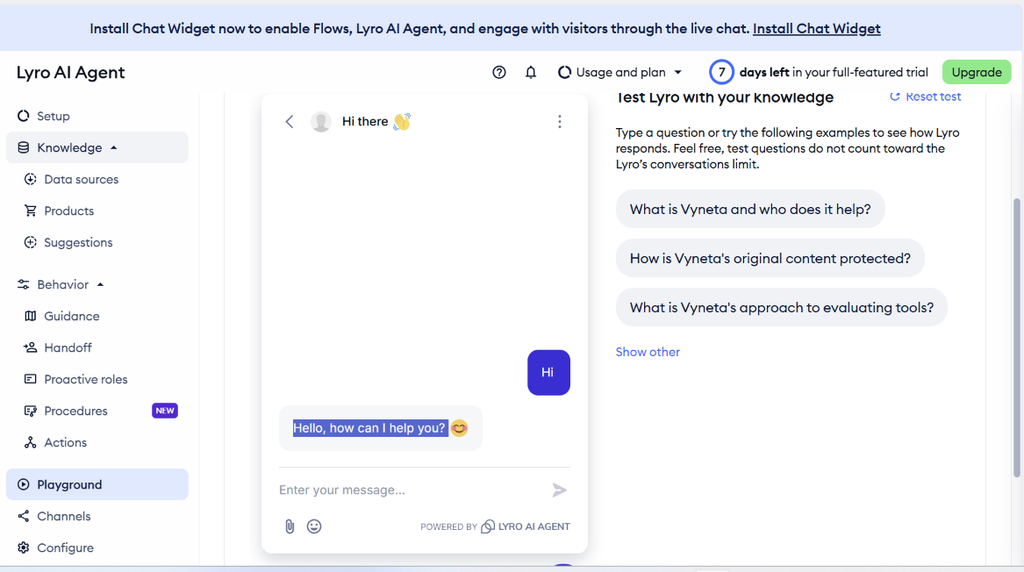
Lyro is the most interesting part of Tidio for us.
Instead of allowing the AI to freely answer questions using general internet knowledge, Lyro can use the content you provide as its knowledge base.
Tidio describes Lyro as an AI agent that answers customer questions using the business content supplied to it.
Test 1: Understanding the Business
We asked:
“What is Vyneta and who does it help?”
Lyro correctly explained that Vyneta helps solopreneurs and small online businesses discover, compare, and choose software.
It also correctly identified the main areas covered by the website.
That showed that Lyro had successfully understood information imported from the website.
Test 2: Understanding the Business Model
We then asked whether Vyneta directly sells software or recommends third-party tools.
Lyro correctly explained that Vyneta does not directly sell or deliver third-party products and that some recommendations may contain affiliate links.
Again, the answer matched the source content.
Test 3: Hallucination Test
This was the most important test.
We asked:
“Which is better for a small Shopify store: Tidio or Gorgias?”
At the time, the website did not contain a detailed Tidio vs. Gorgias comparison.
Instead of making up an answer, Lyro said that it did not have that comparison available in its current knowledge.
That is exactly what we wanted to see.
Test 4: Pricing Hallucination Test
We also asked:
“How much does Tidio cost and which plan should I choose?”
Our knowledge base did not contain Tidio pricing information.
Lyro again refused to invent an answer and recommended checking Tidio’s official website for current pricing.
For a customer support AI, this behavior matters.
A confident but incorrect answer about pricing, refund policies, shipping, or product features can create much bigger problems than admitting that information is unavailable.
Knowledge Sources and AI Guidance
Tidio allows you to control the information Lyro uses to answer questions.
During our test, Lyro imported several pages from the website, including the homepage, About page, Contact page, Guides, Terms of Use, and Affiliate Disclosure.
We were also able to add custom Guidance telling Lyro to:
- answer clearly and concisely;
- use information from the website’s data sources;
- admit when information is missing or potentially outdated;
- avoid inventing prices, features, policies, rankings, or recommendations;
- avoid implying that the website directly sells third-party software.
After activating this guidance, Lyro’s responses became shorter and more disciplined.
For businesses concerned about AI giving customers unsupported answers, this is one of Tidio’s strongest features.
Live Chat and Ticketing
Tidio is not only an AI chatbot.
The platform also provides traditional live chat and ticketing.
The Free plan currently includes 50 billable human-support conversations per month and up to 10 seats. A billable conversation generally refers to a conversation where a human agent responds; Lyro and Flows responses are counted separately.
The Inbox separates:
- Live conversations
- Tickets
- Unassigned conversations
- Open conversations
- Solved conversations
- Lyro conversations
- Spam
For a one-person business, this is more than enough organization to start with.
As the support team grows, conversation limits and automation requirements become more important.
Tidio Pricing in 2026
Tidio pricing deserves careful attention because the platform does not have only one usage limit.
As of September 2026, the official pricing page lists:
| Plan | Starting price |
|---|---|
| Free | $0/month |
| Starter | $24.17/month |
| Growth | From $49.17/month |
| Plus | From $300/month + usage |
| Premium | Custom pricing |
For the latest prices and usage limits, check the official Tidio pricing page.
Starter and Growth prices shown above are based on the pricing currently displayed by Tidio, including annual-billing pricing where applicable. Pricing can change, so always verify the current price before purchasing.
The important part is understanding that Tidio tracks different types of usage separately:
Human support conversations
These count against your customer service conversation allowance.
Lyro AI conversations
Every Tidio account currently starts with 50 free Lyro conversations as a one-time allowance. Continuing at higher usage requires a paid Lyro quota.
Flows visitors
Flows have their own visitor limits.
This means a business should not choose a Tidio plan based only on the headline monthly price.
Estimate how many human conversations, AI conversations, and automated Flow interactions you expect before upgrading.
Tidio Pros and Cons
Pros
Easy WordPress setup
The official plugin makes installation simple without manually editing website code.
Live chat, tickets, automation, and AI in one platform
Small businesses can avoid managing several separate support tools.
Lyro handled missing information well in our tests
It did not invent pricing or competitor comparisons when those answers were unavailable in its knowledge base.
Useful control over AI behavior
Knowledge Sources and Guidance provide more control over how the AI communicates.
Usable Free plan
The Free plan is enough to test the platform and may also be sufficient for very small websites with limited support volume.
Cons
Pricing can become complicated
Human conversations, Lyro conversations, and Flows usage have separate limits.
Costs can rise with volume
The jump from a small website to a growing support operation can significantly change the required plan and usage quota.
Some customization is plan-dependent
For example, certain branding and advanced capabilities require higher plans.
The interface contains more features than a solo operator may initially need
Flows, AI, channels, analytics, actions, procedures, integrations, and support settings can feel like a lot when you first log in.
Who Is Tidio Best For?
Based on our testing, Tidio makes the most sense for:
- Solopreneurs
- Small online businesses
- Small ecommerce stores
- Businesses receiving repetitive customer questions
- Teams that want live chat and AI support in the same system
- WordPress businesses that want a relatively easy setup
A small business can start with human chat and gradually introduce Lyro as the knowledge base improves.
Who Should Probably Skip Tidio?
Tidio may not be the best option if:
- you need extremely predictable pricing at high conversation volumes;
- you already have a mature enterprise help desk that handles everything you need;
- your support workflow requires highly specialized integrations or processes;
- you only need a very simple contact form and receive almost no customer questions.
For a website with only a few support requests per month, adding a full customer-support platform may simply be unnecessary.
Is Tidio Worth It?
For the right type of business, yes.
Tidio does a good job of combining traditional customer support with AI automation without making the initial setup overly technical.
Our strongest positive takeaway was not simply that Lyro could answer questions.
It was that Lyro was willing to not answer when the required information was missing.
That behavior makes the AI more useful for customer service, where an incorrect answer can damage trust quickly.
The trade-off is pricing complexity. Businesses should understand their support volume before moving beyond the Free plan.
For solopreneurs and small online businesses that want to experiment with AI customer support while keeping live chat and human support available, Tidio is one of the tools worth testing.
Vyneta rating: 8.7/10
Tidio FAQ
Is Tidio free?
Yes. Tidio currently offers a Free plan with 50 billable conversations per month, up to 10 seats, and limited Flows usage.
Is Lyro AI free?
Every Tidio account currently receives the first 50 Lyro AI conversations free as a one-time allowance. After that, continued Lyro usage requires a paid quota.
Does Tidio work with WordPress?
Yes. Tidio provides an official WordPress plugin, which is the method we used during our test.
Does Tidio replace human customer support?
Not necessarily.
Lyro can answer questions based on your knowledge sources, while conversations can still be handled by human agents through Tidio’s Inbox.
For many small businesses, the best setup will likely combine AI for repetitive questions with human support for more complex situations.
Overall, our Tidio review found the platform particularly suitable for small online businesses that want AI and live chat in one place.