
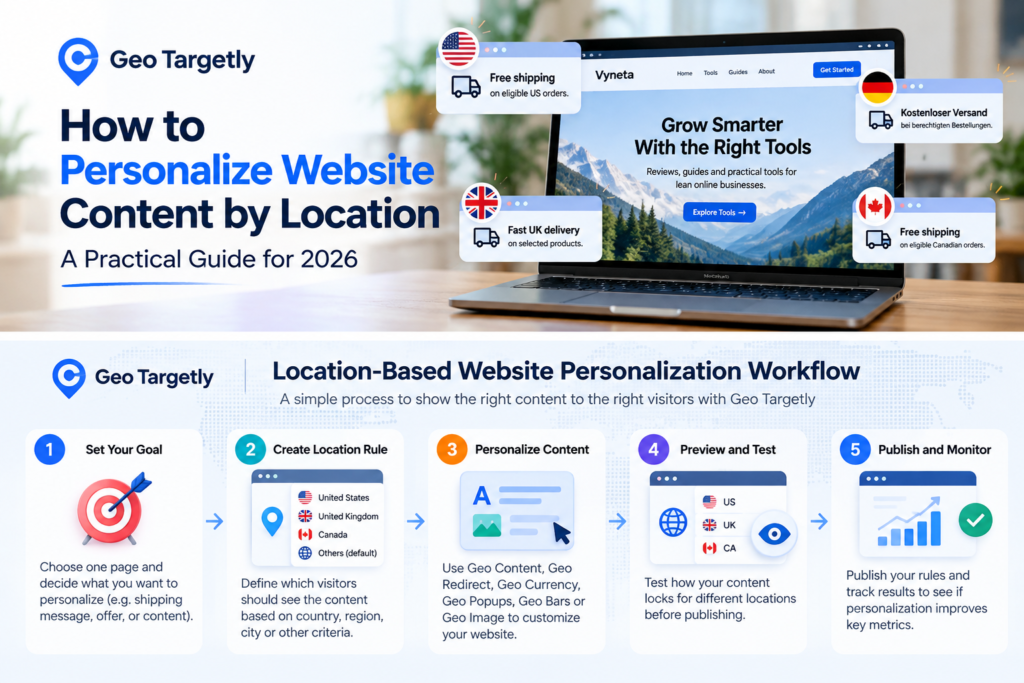
A visitor in New York and a visitor in London do not always need to see exactly the same website.
They may expect different currencies, shipping messages, promotions, contact details, product availability, or even different landing pages.
But building a separate website for every market is usually overkill—especially for a small team.
That is where location-based personalization becomes useful.
In this guide, I’ll show you how to personalize website content by location with Geo Targetly, what you can change, where geo targeting makes sense, and where it can create unnecessary complexity.
Affiliate Disclosure: This article contains affiliate links. If you sign up through one of these links, Vyneta may earn a commission at no extra cost to you. This does not affect our editorial conclusions.
Table of Contents
What Is Location-Based Website Personalization?
Location-based personalization means changing part of a website based on where a visitor is located.
That could be something simple, such as showing:
- a different shipping message
- a local phone number
- a country-specific promotion
- a different image
- local currency
- a regional announcement
Or it could involve more advanced actions such as redirecting visitors to a different page or domain.
Geo Targetly provides several tools for this, including Geo Content, Geo Redirect, Geo Currency, Geo Popups, Geo Bars, Geo Image, and location-data tools. Its Geo Content feature can dynamically change or hide content based on visitor geolocation. Geo Targetly Help Center
The important point is that you do not necessarily have to rebuild the page.
You can keep one underlying website and change selected elements for different audiences.
When Geo Personalization Actually Makes Sense
Geo personalization sounds impressive, but not every website needs it.
For a small online business, I would use it only when location genuinely changes the visitor experience.
Here are some practical examples.
Different Shipping Messages
Suppose your store ships free within the United States but charges for international delivery.
Instead of showing one generic shipping message to everyone, you could display:
US visitors:
“Free shipping on eligible US orders.”
Visitors elsewhere:
“International shipping available. Rates calculated at checkout.”
That is more useful than forcing both groups to interpret a generic message.
Country-Specific Offers
If an offer is only available in one market, there is little value in showing it globally.
A location rule could show:
Free US delivery this week.
only to US visitors.
Visitors elsewhere could see your standard message instead.
Local Contact Information
A business operating across multiple regions might show a different:
- phone number
- support email
- sales contact
- office information
depending on the visitor’s location.
Geo Targetly’s Geo Content system supports changes to elements such as text, links, images and custom HTML. Geo Targetly Help Center
Local Currency
Visitors usually understand pricing faster when it appears in a familiar currency.
Geo Targetly also provides a Geo Currency feature designed to display prices based on visitor location. Geo Targetly
That does not mean every global site needs automatic currency conversion.
But for a store or SaaS serving several large markets, it can remove a small piece of friction.
How to Personalize Website Content by Location With Geo Targetly
The safest way to start is with one small personalization rather than changing half your site on day one.
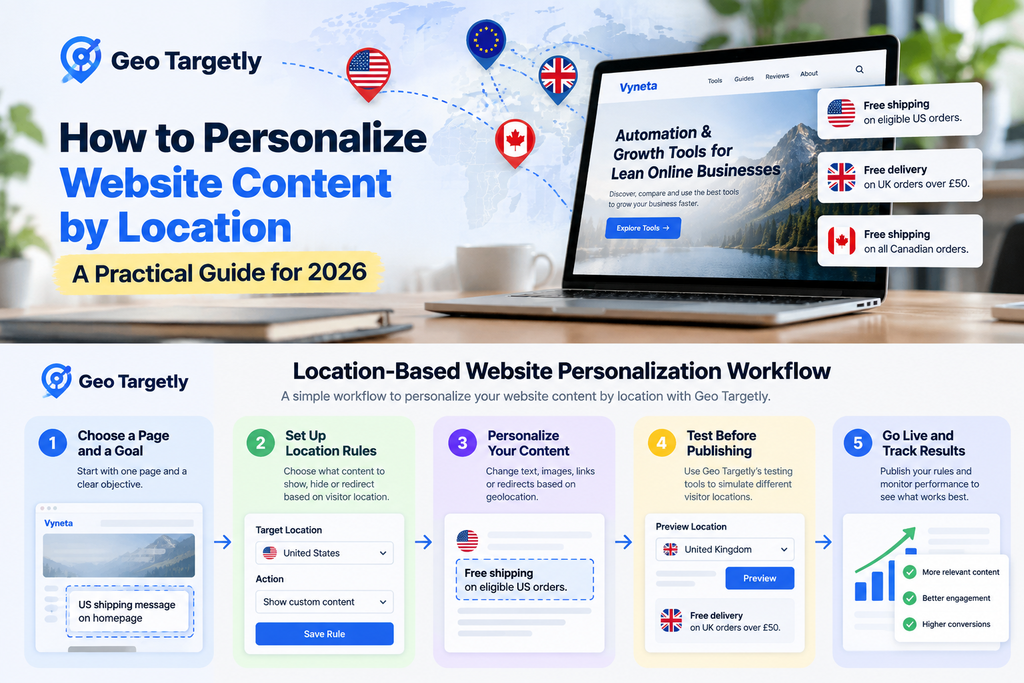
Here is the workflow I would use.
Step 1: Choose One Page and One Goal
Start with a page that already has a clear purpose.
If you want to personalize website content by location, start with one page and one clear business goal.
For example:
- homepage
- pricing page
- product page
- shipping page
- promotion landing page
Then decide exactly what location should change.
Do not start with:
I want a personalized website.
That is too broad.
Start with something measurable:
I want US visitors to see a US shipping message while everyone else sees the standard message.
That gives you one rule, one page, and one result to test.
Step 2: Decide What Should Change
Geo Targetly offers several approaches, so the correct tool depends on what you are trying to accomplish.
Use Geo Content When the Page Stays the Same
Use Geo Content when you want to change an element inside the existing page.
For example:
- text
- images
- links
- phone numbers
- HTML elements
- promotional messages
Geo Targetly says Geo Content can dynamically change or hide website content based on the visitor’s geolocation. Geo Targetly Help Center
This is usually where I would start.
It is less disruptive than redirecting someone to a completely different page.
Use Geo Redirect When the Destination Should Change
Geo Redirect is different.
Instead of changing content on the current page, it can send the visitor to another page or website based on location.
Geo Targetly currently supports redirect targeting by criteria including country, state or region, city, browser language, radius and IP address. Geo Targetly Help Center
For example:
example.com
could route US visitors to:
example.com/us/
and UK visitors to:
example.com/uk/
This can be useful, but redirects deserve more care because they can affect navigation and SEO.
We will come back to that later.
Step 3: Create Your Location Rule
Once you know what should change, define who should see it.
A simple rule might look like:
Location: United States
Action: Show US-specific shipping message
Another could be:
Location: United Kingdom
Action: Show UK-specific promotion
Avoid creating dozens of tiny location segments before you know whether personalization improves anything.
Start with your largest or most important markets.
If 80% of your customers come from three countries, those three matter more than creating individual rules for 40 countries with almost no traffic.
Step 4: Keep a Default Version
This is important.
Every personalization setup should still have a sensible default experience.
Imagine you create special content for:
- United States
- Canada
- United Kingdom
What should someone in Australia see?
They should not get a broken block or empty section.
They should see your normal default content.
Geo Targetly’s Geo Content workflow includes the concept of default content alongside location rules. Geo Targetly Help Center
For a lean team, this keeps the system manageable.
Think of personalization as an enhancement to the default website—not as a replacement for it.
Step 5: Test Before Publishing
Never assume a location rule works just because the settings look correct.
Test it.
Check:
- whether the correct content appears
- whether the default version still works
- mobile layout
- buttons
- affiliate or checkout links
- forms
- page speed
- conflicting rules
Geo Targetly provides testing capabilities that let users simulate different visitor locations before publishing rules live. Geo Targetly
That is particularly useful because you obviously cannot travel to five countries just to verify five versions of a landing page.
A Simple Geo Personalization Example
Imagine you run a SaaS company selling globally.
Your homepage currently says:
Start your free trial today.
That works everywhere.
But suppose US visitors convert better when they see a message emphasizing US support hours.
You could keep the default version:
Start your free trial today.
Then show US visitors:
Start your free trial today. US-friendly support hours available.
The important thing is that you are not changing the entire page.
You are testing one potentially meaningful difference.
This is a healthier way to approach personalization than building a complicated web of location rules before you have any evidence they help.
Good Things to Personalize
Some website elements are naturally suited to geo targeting.
Shipping Information
This is one of the clearest examples.
Delivery options often differ by country.
Showing relevant information early can reduce confusion.
Currency
Local currency can make prices easier to understand.
Just remember that displaying a converted currency and actually charging in that currency are two different things.
Your payment system still needs to support whatever you promise on the page.
Promotions
Location-specific discounts, free shipping thresholds, product launches and events can work well.
Availability
Some products or services may not be offered everywhere.
Hiding an unavailable offer can be better than letting the visitor discover the restriction much later.
Images and Creative
Geo Targetly also supports location-based image personalization. Its current personalization suite includes tools for changing images and other website elements by region. Geo Targetly
This could be useful when different markets respond to different creative.
But I would test text and offers before spending too much time personalizing decorative images.
What I Would Not Personalize Without a Good Reason
More personalization is not automatically better.
I would be cautious with:
Entire Page Layouts
If every country gets a dramatically different experience, maintenance becomes much harder.
Important Legal Information
Do not hide important disclosures simply because you think one audience is less interested in seeing them.
Core Product Claims
The product should not magically become something different depending on location.
SEO Content Just to Manipulate Rankings
Geo targeting should improve visitor relevance.
It should not become an excuse for creating thin variations of the same content for every country.
Geo Redirects Need Extra SEO Care
Redirecting visitors automatically is more sensitive than changing a banner or sentence.
Geo Targetly’s own documentation recommends SEO considerations around geographic redirects, including appropriate hreflang implementation for country or language versions and careful handling of redirection behavior. Geo Targetly Help Center
If you have:
example.com/us/
and:
example.com/uk/
those pages may need a real international SEO structure.
Do not use geo redirects as a shortcut around proper international SEO.
For simple personalization, changing an element on the same page is often easier to manage.
How Much Personalization Should a Small Business Use?
Less than you probably think.
I would start with:
one page + one location rule + one business objective
Then measure what happens.
For example:
Page: Pricing
Audience: United States
Change: US-specific pricing explanation
Goal: More trial clicks
Or:
Page: Product page
Audience: Canada
Change: Canadian shipping message
Goal: Fewer checkout drop-offs
That is enough for a first test.
If it works, expand.
If it does not, remove it.
This is much better than spending days configuring personalization that nobody notices.
What Should You Measure?
Do not measure whether Geo Targetly successfully changed the text.
That is implementation.
Measure whether the changed experience improved something meaningful.
Depending on the page, that could be:
- CTA clicks
- affiliate clicks
- trial starts
- checkout starts
- form submissions
- bounce or engagement behavior
- purchases
This is also why analytics matter.
Personalization without measurement can easily become decoration.
Is Geo Targetly Only for Large Global Companies?
No.
A small site can benefit if geography genuinely changes the offer.
The more important question is not company size.
It is:
Does the visitor’s location change what they need to know?
If the answer is no, geo personalization probably adds unnecessary work.
If the answer is yes, Geo Targetly can provide a practical way to manage those differences without maintaining completely separate websites.
For a deeper look at the product itself, its features, use cases, limitations and pricing structure, see our Geo Targetly review.
Final Thoughts
Geo personalization works best when it removes friction.
It should help visitors understand:
- what applies to them
- what they can buy
- how much something costs
- where something is available
- what action they should take next
It should not make your website harder to maintain.
If you want to personalize website content by location with Geo Targetly, start with one obvious use case, test the experience carefully, and measure whether it improves a real business outcome.
Then expand only when the data gives you a reason to.