
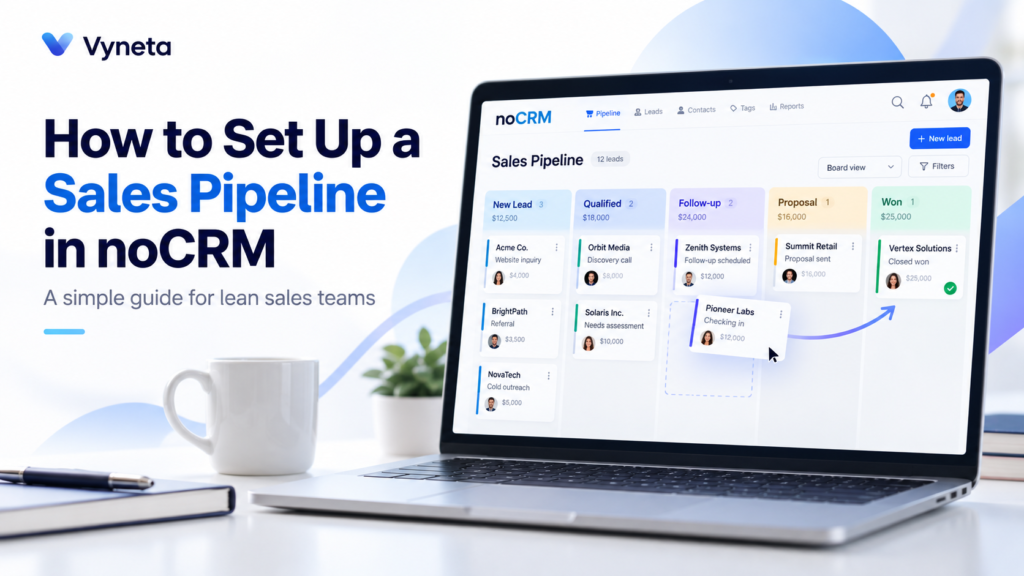
A sales pipeline should make selling easier.
But in many small teams, it becomes another system to maintain.
Too many stages. Too many fields. Too much admin. And eventually, the sales team stops updating it.
A simpler approach is to build a pipeline around the actions that actually move a lead forward.
That is where noCRM makes sense.
Instead of treating every contact as a database record, noCRM focuses on active sales opportunities and gives teams a visual pipeline they can move through step by step. Its pipeline can be customized to match your own sales process, and leads can be moved between stages with a simple drag-and-drop workflow.
Affiliate Disclosure: This article contains affiliate links. If you sign up through one of these links, Vyneta may earn a commission at no extra cost to you. This does not affect our editorial conclusions.
Table of Contents
What Is a Sales Pipeline?
A sales pipeline is a visual representation of where each active opportunity is in your sales process.
A simple pipeline might look like this:
New Lead → Contacted → Qualified → Proposal Sent → Won
Each stage answers one question:
What needs to happen next?
That is more useful than storing dozens of fields that nobody looks at.
For a small sales team, the goal should be clarity.
You should be able to open the pipeline and immediately see:
- which deals are new
- which leads need follow-up
- which opportunities are moving
- which deals are stuck
- which sales are close to closing
noCRM is built around this action-focused model rather than a traditional contact-heavy CRM structure. Its visual pipeline lets users organize leads by sales step and move them from one column to another.
Why Keep Your Sales Pipeline Simple?
A complicated pipeline usually creates more work than value.
If you create 12 stages for a sales process that really only needs five, your team has to constantly decide where every lead belongs.
That creates friction.
A simpler pipeline helps because:
- stages are easier to understand
- follow-ups are easier to prioritize
- reports are easier to interpret
- sales reps are more likely to keep data updated
- bottlenecks become easier to spot
The best pipeline is not the most detailed one.
It is the one your team actually uses.
How to Build a Simple Sales Pipeline With noCRM
noCRM lets account admins define and reorder their own sales steps. The platform includes predefined steps, but they can be edited, deleted, or replaced with your own process. Nocrm Help
Here is a practical setup for a lean team.
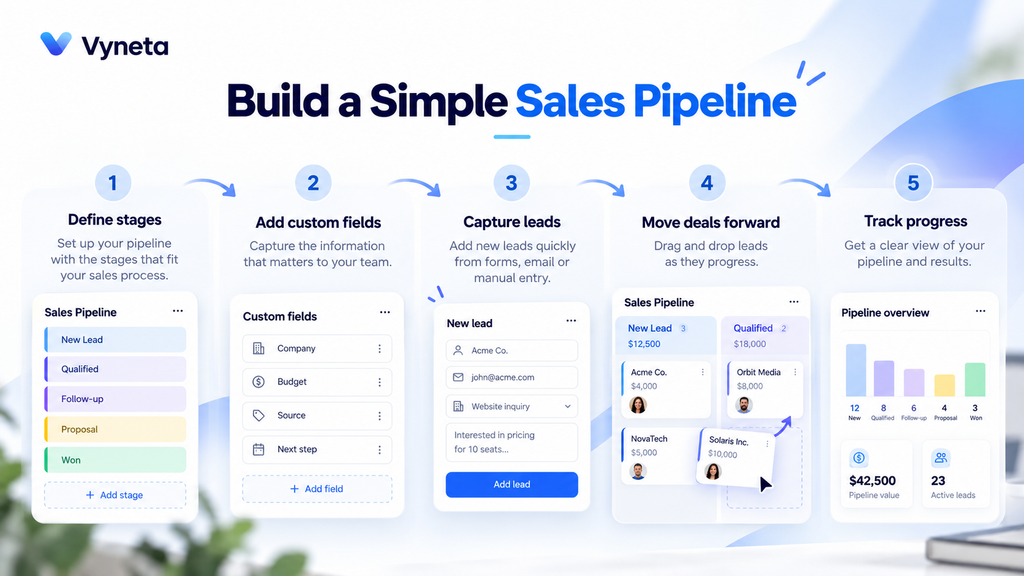
Step 1: Define the Real Stages of Your Sales Process
Do not start by copying another company’s CRM.
Start with how you actually sell.
Ask:
- How does a new opportunity enter the business?
- What qualifies someone as worth pursuing?
- When do you make an offer?
- What has to happen before a deal closes?
For many small B2B teams, five stages are enough:
New Lead
A potential opportunity has entered the pipeline but has not been properly reviewed yet.
Contacted
You have reached out or started a conversation.
Qualified
The lead appears to have a real need, budget, fit, or buying intent.
Proposal / Decision
You have sent pricing, a proposal, demo, or commercial offer.
Won
The deal is closed.
You can also track lost opportunities separately rather than creating too many intermediate stages.
noCRM allows admins to customize and reorder pipeline steps from the sales process settings.
Step 2: Avoid Creating Too Many Stages
This is one of the most common pipeline mistakes.
A stage should represent a meaningful change in the sales process.
Do not create separate stages just because an action happened.
For example:
- Email sent
- Follow-up email sent
- Call booked
- Call completed
Those may be activities, not pipeline stages.
If your pipeline becomes too detailed, you spend more time maintaining it than using it.
Instead, keep stages tied to buying progress.
A good test is:
If a lead moves into this stage, has something meaningful changed?
If the answer is no, it probably does not need to be a separate stage.
Step 3: Set Up Your Pipeline in noCRM
Inside noCRM, admins can configure pipeline steps from:
Admin Panel → Sales Process → Pipeline Steps
The platform allows you to create, edit, delete, and reorder stages. New leads are assigned to the first stage by default. Nocrm Help
For a simple setup, I would create:
- New Lead
- Contacted
- Qualified
- Proposal Sent
- Won
If you want to build a simple sales pipeline, start with these five stages and only add more when your real sales process requires it.
That is enough to start.
You can always refine the process later when real usage shows where more structure is needed.
Step 4: Add Only the Lead Information You Actually Need
A CRM can easily become a form-filling exercise.
Avoid that.
noCRM allows users to define lead fields and custom fields, but the better question is not:
What information can we store?
It is:
What information helps us sell?
Useful fields might include:
- contact name
- company
- phone
- estimated deal value
- source
- product or service interest
- next action
noCRM supports predefined lead fields and custom fields so teams can structure lead information around their own workflow.
Do not create 20 fields if your team only uses six.
Step 5: Import Existing Opportunities
If you already have active leads in a spreadsheet, you do not need to start from zero.
noCRM supports importing leads into the pipeline from CSV files. Its current help documentation says lead imports can contain up to 3,000 rows per CSV file.
Before importing, clean the spreadsheet.
Remove:
- old contacts with no current opportunity
- duplicate records
- incomplete entries you no longer need
- irrelevant historical data
A pipeline works better when it reflects active selling, not every person your business has ever contacted.
Step 6: Move Leads Based on Real Progress
Once the pipeline is live, move leads only when the deal actually progresses.
In noCRM’s Pipeline View, leads appear under their current sales step and can be dragged from one column to another.
For example:
New Lead → Contacted
only after outreach has actually happened.
Contacted → Qualified
only after you confirm the opportunity is worth pursuing.
Qualified → Proposal Sent
only after a real commercial offer has been made.
This sounds obvious, but consistent stage definitions matter.
If every salesperson interprets stages differently, pipeline reports become unreliable.
Step 7: Always Set the Next Action
A good pipeline tells you where a deal is.
A good sales workflow also tells you what happens next.
noCRM includes follow-up tools for planning calls, meetings, emails, and reminders. noCRM
For each active lead, define a next action.
For example:
- Call Thursday
- Send pricing tomorrow
- Follow up after demo
- Ask for decision next week
A lead without a next action is often a lead that gets forgotten.
Step 8: Use the Pipeline View to Find Bottlenecks
A pipeline is not just a place to store deals.
It should help you identify problems.
For example:
Too Many Leads in Contacted
Your outreach may be getting responses but not enough qualification.
Too Many Leads in Qualified
Your team may be slow to send proposals.
Too Many Proposals Without Wins
Your offer, pricing, or sales process may need work.
noCRM’s Pipeline View is designed to provide an overview of leads by sales step, which makes it easier to see where opportunities are accumulating.
That is where a simple pipeline becomes useful.
The fewer unnecessary stages you have, the easier bottlenecks are to see.
When Should You Use Multiple Pipelines?
Do not create multiple pipelines too early.
One pipeline is usually enough when:
- the same team sells one core offer
- the sales process is mostly consistent
- the same stages apply to most opportunities
Multiple pipelines make sense when sales processes are genuinely different.
For example:
- New Business
- Account Management
- Enterprise Sales
- Partnerships
noCRM supports multiple pipelines, and some pipeline-to-team or user customization is available in its Dream edition. noCRM
For a small business, start with one.
Add more only when the workflow requires it.
A Simple noCRM Pipeline Example
Imagine a small marketing agency.
Its pipeline might look like this:
New Lead
A business fills in a contact form.
Contacted
The agency responds and books a discovery call.
Qualified
The prospect has the right budget and needs the service.
Proposal Sent
The agency sends scope and pricing.
Won
The client accepts the offer.
That is enough.
You do not need separate stages for:
- Email opened
- Meeting scheduled
- Meeting completed
- Proposal viewed
- Second follow-up
Those are useful activities, but not necessarily meaningful pipeline stages.
Want to map your own pipeline before setting it up in software? Our free Simple Sales Pipeline Workbook helps you define stage criteria, assign a next action to each opportunity and adapt three follow-up messages. Use it with noCRM, another CRM or a spreadsheet.
What Should You Track?
A small sales team does not need dozens of reports.
Start with a few useful numbers:
- number of active opportunities
- opportunities by stage
- win rate
- average deal value
- time spent in each stage
- lost deals
- sales activity by rep
noCRM also includes team performance reporting and sales tracking features, depending on the plan and configuration. noCRM
The purpose of reporting is to improve decisions.
Not to create more dashboards.
Common Sales Pipeline Mistakes
Too Many Stages
Keep the process simple enough that every stage means something.
No Clear Definition of Qualified
If one rep calls a lead qualified after one email and another waits until a demo, your data becomes inconsistent.
No Next Action
Every active deal should have a clear follow-up.
Keeping Dead Deals Active
If the opportunity is gone, mark it accordingly.
A pipeline full of dead leads makes the business look healthier than it is.
Tracking Everything
Do not capture data just because the CRM allows it.
Track information that helps the team sell.
Is noCRM a Good Fit for Small Sales Teams?
It can be a good fit when the team wants something more action-oriented than a traditional CRM.
noCRM currently positions itself around lead management, visual pipelines, reminders, email, integrations, mobile access, reporting, and sales automation without the heavy administrative structure of larger CRM platforms.
It is especially relevant for:
- small B2B sales teams
- agencies
- consultants
- service businesses
- founder-led sales
- teams moving away from spreadsheets
For a deeper look at the platform, features, pricing, strengths, and limitations, read our noCRM review.
Final Thoughts
A sales pipeline should help your team decide what to do next.
It should not become another administrative system to manage.
If you want to build a simple sales pipeline, noCRM gives you a practical way to start with five stages, use only the fields that matter, and keep every active lead tied to a clear next action.
Do not optimize the pipeline before people have actually used it.
Start simple.
Let real sales activity show you what needs to change.