
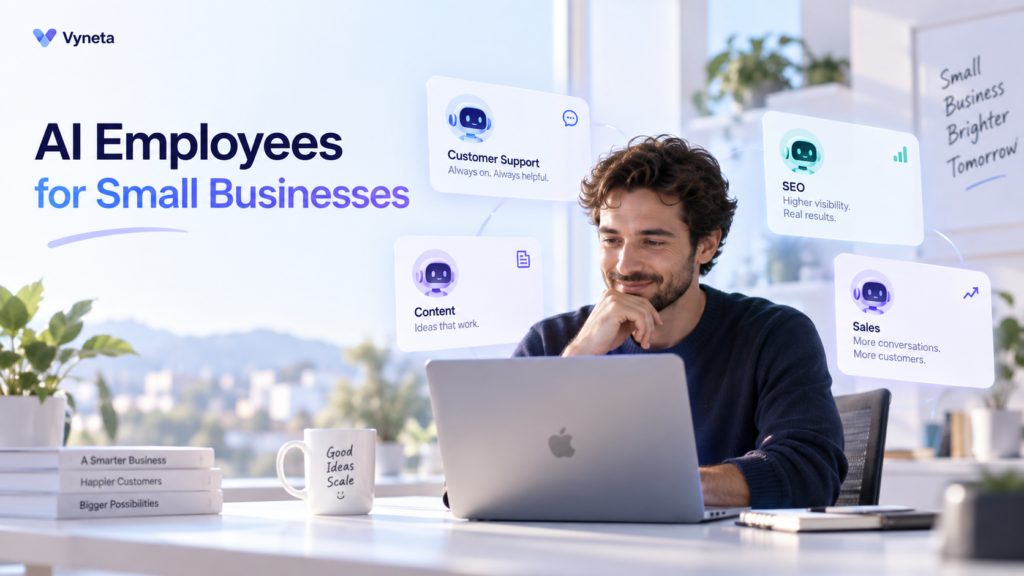
Disclosure: This guide contains affiliate links. If you purchase through them, Vyneta may earn a commission at no extra cost to you. Our recommendations are based on product research and hands-on testing where applicable.
Running a small online business often means doing several jobs at once.
You may be the marketer, customer support agent, content creator, researcher, salesperson, and operations manager — sometimes all in the same day.
That is why the idea of AI employees for small business has become increasingly attractive.
Instead of using AI only to answer a question or write a paragraph, newer AI platforms promise agents that can take responsibility for recurring business tasks, use company knowledge, interact with other software, and continue working toward defined goals.
But the term “AI employee” can also create unrealistic expectations.
These systems are not digital humans that can independently run your company.
They are better understood as specialized AI agents configured around specific business roles, tools, knowledge, and workflows.
This guide explains what AI employees can realistically do today, where they still need human supervision, and when they make sense for a lean online business.
Table of Contents
Quick Answer: What Is an AI Employee?
An AI employee is typically an AI agent configured to handle a defined business role or group of tasks.
For example, a platform might create separate AI employees for:
- SEO research
- customer support
- sales prospecting
- content creation
- lead qualification
- administrative workflows
The underlying technology is closer to an AI agent than a traditional employee.
IBM defines an AI agent as a system capable of autonomously performing tasks by planning workflows and using available tools. Agents can make decisions, solve problems, access external information, and perform actions rather than only generating text.
The phrase “AI employee” is therefore most useful as a business-oriented way to describe an agent that has been given a role, instructions, knowledge, and permission to use specific tools.
It should not be interpreted as a complete replacement for human staff.
AI Employee vs AI Agent vs Traditional Automation
These terms are often used interchangeably, but they describe different levels of automation.
| Approach | How it works | Best for | Human involvement |
|---|---|---|---|
| Traditional automation | Follows predefined triggers and rules | Repetitive, predictable processes | Low after setup |
| AI assistant | Responds to prompts or requests | Writing, brainstorming, answering questions | High |
| AI agent | Pursues goals and can choose tools/actions | Multi-step, changing workflows | Medium |
| “AI employee” | AI agent organized around a business role | Ongoing business functions | Medium |
Traditional automation works best when the workflow is predictable.
For example:
New form submission → add contact to CRM → send confirmation email
The system does not need to reason about what to do.
An AI agent is different because it can evaluate a goal, decide what information it needs, choose tools, and perform multiple steps. IBM describes this as a move from reactive assistance toward systems that can plan and take actions with greater autonomy.
That distinction matters.
You do not need an AI employee for every workflow.
If a simple rule can reliably solve the problem, traditional automation is often cheaper, faster, and more predictable.
What Can AI Employees for Small Business Actually Do?
The most useful AI employees are not the ones trying to “run the business.”
They are the ones that take responsibility for a narrow, repeatable area of work.
Here are the most practical use cases.
1. Customer Support
Customer support is one of the clearest use cases.
An AI employee can potentially:
- answer repetitive questions
- search a company knowledge base
- explain product information
- summarize conversations
- classify support requests
- draft responses
- escalate difficult cases to a human
The quality of the result depends heavily on the quality of the information available to the agent.
If the knowledge base is incomplete or outdated, the answers can also be incomplete or wrong.
This is why businesses should not simply connect an AI agent and assume customer support is “automated.”
A better setup is:
knowledge base → AI handles routine questions → human handles exceptions
For a deeper explanation of where AI works well in support and where humans remain necessary, see our AI Customer Support for Small Businesses guide.
2. Research and SEO
An AI employee can also support research-heavy work.
Typical tasks include:
- summarizing existing website content
- identifying content gaps
- generating keyword ideas
- comparing pages
- organizing research
- suggesting internal links
- creating first-draft briefs
This can save time, but there is an important limitation:
AI cannot reliably audit information it does not have access to.
If an agent has only crawled five pages of a 100-page website, its recommendations are based on those five pages — not the complete site.
That sounds obvious, but it is easy to forget when the AI gives a confident answer.
For SEO work, AI employees are most useful as research and analysis assistants rather than automatic decision-makers.
3. Content Creation
AI employees can help create:
- blog outlines
- first drafts
- social posts
- email sequences
- product descriptions
- campaign ideas
- repurposed content
This is useful for lean teams because one piece of research can potentially become several content formats.
But content generation is also where human review becomes especially important.
Generative AI systems can produce statements that sound credible but are factually incorrect. NIST refers to this problem as “confabulation” — confidently generated erroneous or false information.
NIST Generative AI Risk Management Profile
For that reason, our preferred workflow is:
AI draft → verify facts → edit → add sources → optimize → publish
not:
AI draft → publish
That extra review step is particularly important for reviews, financial information, statistics, technical claims, and content that affects a buying decision.
4. Lead Generation and Sales Research
For B2B companies, consultants, agencies, and SaaS businesses, AI employees can assist with prospecting.
Possible tasks include:
- researching companies
- enriching lead information
- segmenting prospects
- qualifying leads
- drafting outreach
- building personalized sequences
- summarizing prospect activity
The value here comes from combining research and actions.
Instead of manually researching each company and then writing an email, an agent can potentially handle several parts of the workflow.
However, outbound automation still needs controls.
Poor targeting plus AI-generated outreach can simply produce more low-quality spam.
Automation increases scale.
It does not automatically increase relevance.
5. Repetitive Administrative Work
AI employees can also help with less visible work, such as:
- summarizing documents
- organizing information
- preparing meeting notes
- categorizing requests
- extracting data from files
- monitoring recurring workflows
- creating recurring reports
These tasks may not sound exciting, but they can be some of the highest-value uses of AI.
A task that takes 10 minutes but happens 20 times per week can consume far more time than an occasional complex project.
For small businesses, automation usually delivers the most value when it removes repeated friction rather than trying to replace strategic work.
6. Knowledge-Base Work
A strong knowledge base can make AI employees significantly more useful.
Instead of relying only on general model knowledge, an agent can work with:
- company documentation
- website pages
- product information
- internal processes
- FAQs
- policies
- support documents
This is one area we tested directly with Parallel AI.
Its documentation describes the Knowledge Base as the place where agents learn about a business, with website crawling used to bring company information into the workspace.
The important lesson is simple:
the better the knowledge source, the better the chance of getting a grounded answer.
It still does not guarantee correctness, but it gives the agent a more useful foundation.
A Real Example: What We Saw Testing Parallel AI
To understand how the “AI employee” concept works in practice, we tested Parallel AI using Vyneta as the business.
This was not a landing-page evaluation.
We created an account, allowed the platform to analyze Vyneta, added website content to its knowledge base, and interacted with several specialized AI employees.
During onboarding, Parallel AI created roles including:
- an SEO specialist
- a customer experience specialist
- a sales development role
- a go-to-market role
It also generated:
- an ideal customer profile
- a sales sequence
- content drafts
- a website knowledge base
- marketing ideas
The most convincing result came from its knowledge-based agents.
When we asked the customer experience agent questions about Vyneta’s existing content, it was able to separate what it could verify from what was missing.
After we added another Vyneta guide to the Knowledge Base, the agent’s answer improved.
That was a useful demonstration of how an AI employee can become more effective when its business context improves.
The weaker area was content generation.
The Content Engine produced a well-structured long-form article, but it also included numerical claims without providing reliable sources.
That reinforced an important principle:
AI employees can reduce work, but they should not remove accountability.
We documented the complete test, pricing, strengths, weaknesses, and screenshots in our Parallel AI Review 2026.
Where AI Employees Still Need Human Oversight
AI employees are most useful when you are clear about what they should not control alone.
Factual accuracy
AI-generated answers can contain errors even when they sound confident.
This means factual content needs verification.
Brand judgment
An AI system can learn tone guidelines, but deciding whether something truly represents your brand still benefits from human judgment.
Sensitive customer issues
Refund disputes, complaints, unusual cases, or emotional conversations often need escalation.
Strategic decisions
AI can collect evidence and suggest options.
That does not mean it should independently decide:
- which market to enter
- which product to discontinue
- how much money to invest
- which major business risk to accept
Access and permissions
An agent that can only draft an email creates limited risk.
An agent that can:
- send emails
- edit customer records
- issue refunds
- publish content
- change campaigns
has much greater potential impact.
Give AI employees only the permissions they genuinely need.
The Best Model Is Usually Human + AI
The useful question is not:
“Can AI replace this person?”
A better question is:
“Which parts of this workflow should AI handle, and which parts still require human judgment?”
For example, customer support might look like:
AI
- finds relevant documentation
- identifies the issue
- drafts an answer
- handles simple FAQs
Human
- reviews unusual cases
- handles complaints
- approves exceptions
- updates policies
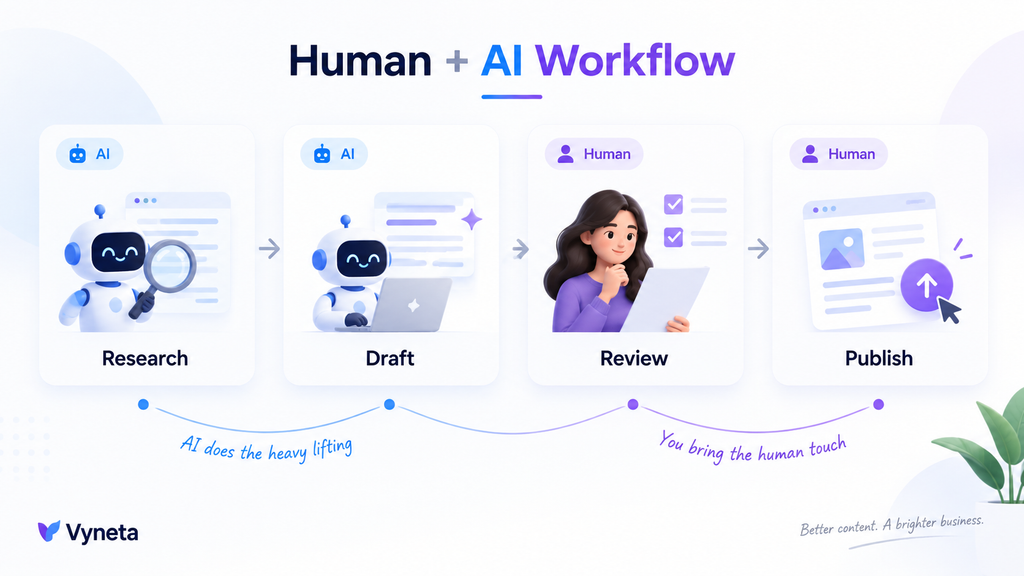
The same principle applies to content:
AI
- researches
- outlines
- drafts
- summarizes
Human
- verifies
- adds firsthand experience
- makes editorial decisions
- approves publication
This hybrid approach is usually more realistic than trying to build a fully autonomous company.
How Much Do AI Employees Cost?
There is no single price for an AI employee.
Costs can include:
- platform subscriptions
- AI usage credits
- data enrichment
- integrations
- additional seats
- API usage
- setup time
- human review time
That last cost is easy to ignore.
A cheap AI tool that produces unreliable work can become expensive if someone must constantly fix it.
A more useful calculation is:
total cost of workflow after AI
rather than:
monthly software price
As a real example, Parallel AI currently lists a $0 Pay As You Go plan with 50 starting credits and no credit card required. Its Entrepreneur plan starts at $99 per month with 2,000 monthly credits, while Business starts at $297 per month with 9,000 monthly credits; the pricing page also shows different monthly rates when not paying annually.
Pricing changes, so always check the vendor’s current page before making a decision.
Who Should Use AI Employees?
AI employees make the most sense when your business has repeated workflows but limited human capacity.
Good candidates include:
Solopreneurs
One person may be handling marketing, support, content, and operations.
AI can help reduce task switching.
Small online businesses
A small team can use agents to handle repetitive work without immediately adding more software or headcount.
Agencies
Agents can help with research, content preparation, lead analysis, reporting, and repeatable client workflows.
SaaS businesses
Knowledge-based support, lead qualification, onboarding, and sales research are natural use cases.
Ecommerce businesses
AI can assist with support questions, product information, content, research, and operational workflows.
But suitability depends on the actual workflow — not simply the industry.
Who Probably Does Not Need an AI Employee Yet?
You probably do not need an AI employee just because the technology exists.
A simpler tool may be better if:
- you have very few repetitive tasks
- your workflow is already well automated
- a basic chatbot solves the problem
- you only need occasional writing help
- your business information is poorly organized
- you do not have time to review AI output
In many cases, the first automation should not involve AI at all.
If the process is:
When X happens → always do Y
a conventional automation is usually sufficient.
Use AI when interpretation, context, language, research, or flexible decision-making actually adds value.
How to Evaluate an AI Employee Platform
Before paying for one, test the platform against a real workflow.
Do not judge it only from a demo.
1. Give it real business information
Add actual documentation or website content.
Then see whether the output improves.
2. Ask questions it cannot answer
This is one of our favorite tests.
A good system should acknowledge missing information instead of inventing an answer.
3. Test one repeated workflow
Choose a real task such as:
- support FAQ handling
- SEO research
- lead research
- content preparation
Then compare:
time before AI vs time after AI
4. Check the output carefully
Look for:
- fabricated facts
- outdated data
- unsupported statistics
- incorrect assumptions
- poor recommendations
5. Check the real cost
Include:
- subscription
- credits
- add-ons
- human review
- setup
6. Check integrations and permissions
Ask whether the agent can safely connect to the tools you actually use.
More integrations are not automatically better.
The relevant integrations are the ones your workflow depends on.
AI Employees and Customer Support Automation
Customer support deserves special attention because it is often one of the first areas small businesses try to automate.
The biggest mistake is trying to automate everything immediately.
A better approach is to identify repetitive tasks first:
- FAQs
- order information
- basic troubleshooting
- ticket categorization
- response drafting
Then keep humans involved for difficult cases.
We cover this workflow in more detail in Customer Support Automation for Small Businesses: 9 Tasks to Automate First.
Are AI Employees Worth It for Small Businesses?
They can be — but only when attached to a useful workflow.
The value of an AI employee does not come from giving a chatbot a job title.
It comes from combining:
a defined role + reliable knowledge + useful tools + clear permissions + human oversight
For lean businesses, that can be powerful.
An AI agent can take care of research, draft repetitive content, answer routine questions, prepare outreach, or organize information while the owner focuses on decisions that require judgment.
But autonomy should be earned gradually.
Start with low-risk tasks.
Measure the quality.
Improve the knowledge base.
Then give the agent more responsibility only when the results justify it.
Final Takeaway
AI employees are not digital replacements for an entire team.
At least today, the more useful way to think about them is as specialized AI agents that can own parts of a workflow.
For a small business, the strongest use cases are usually:
- repetitive customer support
- research
- content preparation
- lead and sales research
- knowledge retrieval
- recurring administrative work
Their biggest advantage is leverage.
Their biggest risk is assuming that confident AI output is automatically correct.
If you are interested in seeing how this works inside a real AI employee platform, read our hands-on Parallel AI Review 2026.
Frequently Asked Questions
What is an AI employee?
An AI employee is generally an AI agent configured around a specific business role, such as customer support, SEO, sales, research, or content. It may have access to business knowledge and tools that allow it to perform tasks beyond answering prompts.
Is an AI employee the same as an AI agent?
Usually, the underlying technology is an AI agent. “AI employee” is a business-oriented way of packaging an agent around a role, responsibilities, tools, and recurring workflows.
Can AI employees replace human employees?
They can automate parts of a role, but that is different from replacing the entire role. Tasks involving judgment, accountability, unusual situations, strategy, and sensitive communication still often need human involvement.
Are AI employees useful for solopreneurs?
Potentially, yes. Solopreneurs frequently manage several business functions, so AI can be particularly useful for repetitive research, content preparation, support, and administrative work.
Do AI employees make mistakes?
Yes. AI systems can generate inaccurate or unsupported information. High-impact outputs should be reviewed, and agents should only receive permissions appropriate to their reliability and task.
Should I use AI employees or traditional automation?
Use traditional automation for predictable rule-based workflows. Consider AI agents when the task requires interpretation, language, context, research, or flexible multi-step decisions.