

Disclosure: This guide contains affiliate links. If you purchase through them, Vyneta may earn a commission at no extra cost to you. Our recommendations are based on product research and hands-on testing where applicable.
Customer support can become time-consuming long before a business is large enough to hire a dedicated support team.
A few repetitive questions turn into dozens. Order updates need to be checked manually. The same answers are typed again and again. Customers arrive outside working hours, while important conversations compete with marketing, operations, and everything else a small team needs to manage.
That is where automation can help.
But effective automation does not mean turning every customer interaction over to software.
The goal of customer support automation for small businesses is simpler: remove repetitive work, organize incoming requests, and help customers get faster answers while keeping humans involved where judgment and context matter.
This guide explains which support tasks are usually worth automating first, which tasks should remain human, and how to introduce automation without making the customer experience worse.
If you are still choosing the underlying platform, start with our guide to How to Choose Customer Support Software for a Small Online Business.
Table of Contents
What Is Customer Support Automation?
Customer support automation uses software to handle predictable parts of the support process without requiring a person to complete every step manually.
That can include automatically answering common questions, routing conversations, collecting customer information, assigning tickets, sending status updates, suggesting replies, or escalating a conversation when human attention is required.
Automation can be simple.
A contact form that automatically sends the right confirmation email is automation. So is a rule that routes billing questions to one inbox and technical questions to another.
More advanced systems may use AI to understand customer intent, search a knowledge base, draft responses, or resolve routine questions.
The important point is that automation is not one feature.
It is a collection of small improvements that remove unnecessary manual work from a support workflow.
Why Small Businesses Should Automate Selectively
Large support teams may have specialists, managers, dedicated documentation, and complex ticketing systems.
Small businesses usually do not.
One person may handle support in the morning, marketing in the afternoon, and fulfillment or operations in between.
That makes time valuable, but it also makes unnecessary complexity dangerous.
A support workflow with too many rules, tools, and automations can become harder to maintain than the manual process it replaced.
For lean teams, the best automation usually has three characteristics: the task happens frequently, the correct action is predictable, and automating it creates little risk if the workflow runs without human involvement.
Start with those tasks.
Leave complicated decisions for people.
1. Automate Answers to Repetitive Questions
Frequently asked questions are often the best place to start.
Customers may repeatedly ask about shipping times, returns, account access, product availability, business hours, setup instructions, or how a particular feature works.
When the correct answer already exists in your website or knowledge base, requiring a person to type essentially the same response every time creates unnecessary work.
Automation can provide the first answer immediately through a chatbot, help center suggestion, saved reply, or AI assistant.
The information behind those answers must stay accurate.
Automation cannot compensate for outdated policies or incomplete documentation. It will simply deliver bad information faster.
For businesses exploring AI for this purpose, our guide to AI Customer Support for Small Businesses explains where AI performs well and where human oversight still matters.
2. Automate Conversation Routing
Not every message should go to the same place.
A pre-sale question, refund request, technical issue, and billing problem may require completely different actions.
Basic routing rules can classify conversations using information such as the selected topic, message content, customer status, product, channel, or form submission.
The system can then send the conversation to the appropriate person, inbox, or workflow.
Even for a one-person business, routing can be useful.
Instead of treating every message as an undifferentiated inbox item, you can group similar conversations and process them more efficiently.
As a team grows, this becomes even more valuable because agents spend less time deciding who should handle each request.
3. Automate Information Collection Before a Human Responds
Many support conversations begin with a predictable information-gathering process.
An agent may need an order number, email address, website URL, account identifier, product name, or description of the problem before they can do anything useful.
That information does not always need to be collected manually.
A form, chatbot, or automated workflow can ask the necessary questions before the conversation reaches a person.
This reduces back-and-forth messages and allows the human agent to start with more context.
Good automation should collect only what is actually necessary.
Long questionnaires can create more friction than they remove.
4. Automate Acknowledgement and First Responses
Customers should know that their message has been received.
A simple confirmation can set expectations and reduce repeat messages such as “Did you receive my request?”
An automated first response can confirm the request, explain expected response times, provide helpful resources, or offer an immediate answer to common questions.
This is particularly useful outside working hours.
The message should be transparent.
Do not make an automated response sound like a human has personally reviewed the situation when nobody has.
The goal is to reduce uncertainty, not create false expectations.
5. Automate Ticket Tags and Conversation Classification
Manual tagging is easy to ignore when a business is busy.
Yet useful tags can make support data far easier to understand.
Automation can categorize conversations by topic, urgency, product, customer type, channel, or other relevant characteristics.
Over time, that information can answer useful questions.
What problems appear most often? Which products create the most support conversations? Are customers repeatedly confused by the same policy or feature?
Support automation should not only save time during individual conversations.
It can also make recurring problems easier to identify.
6. Automate Simple Status Updates
Customers often contact support because they want an update rather than a decision.
Examples include asking whether a request was received, whether an order has shipped, whether an issue is still being reviewed, or what happens next.
When the underlying information is reliable and available to the support system, some status updates can be automated.
This can reduce low-complexity conversations without reducing service quality.
However, status automation should only use information the system actually knows.
If the workflow cannot verify a shipping event, refund state, or account change, it should not invent one.
Accuracy is more important than automation coverage.
7. Use AI to Assist Human Agents
Automation does not have to communicate directly with customers.
AI can operate behind the scenes and help a human agent work faster.
Depending on the platform, AI may summarize a conversation, suggest a response, find relevant documentation, rewrite a draft, classify the request, or surface previous customer context.
This is a useful middle ground for businesses that want efficiency without allowing AI to resolve every conversation independently.
The agent remains responsible for the final response.
That can be especially valuable for complex or sensitive cases where wording and judgment matter.
8. Automate Follow-Ups Where the Outcome Is Predictable
Some follow-ups do not require manual intervention.
For example, a system may send a confirmation after a form submission, ask whether an issue has been resolved, provide a relevant help resource, or close an inactive conversation after a defined period.
These small workflows can prevent support queues from filling with conversations that no longer require action.
Avoid excessive follow-ups.
An automation that repeatedly emails customers because they did not reply can quickly become annoying.
Every automated message should have a clear purpose.
9. Automate Escalation Rules — Not the Final Judgment
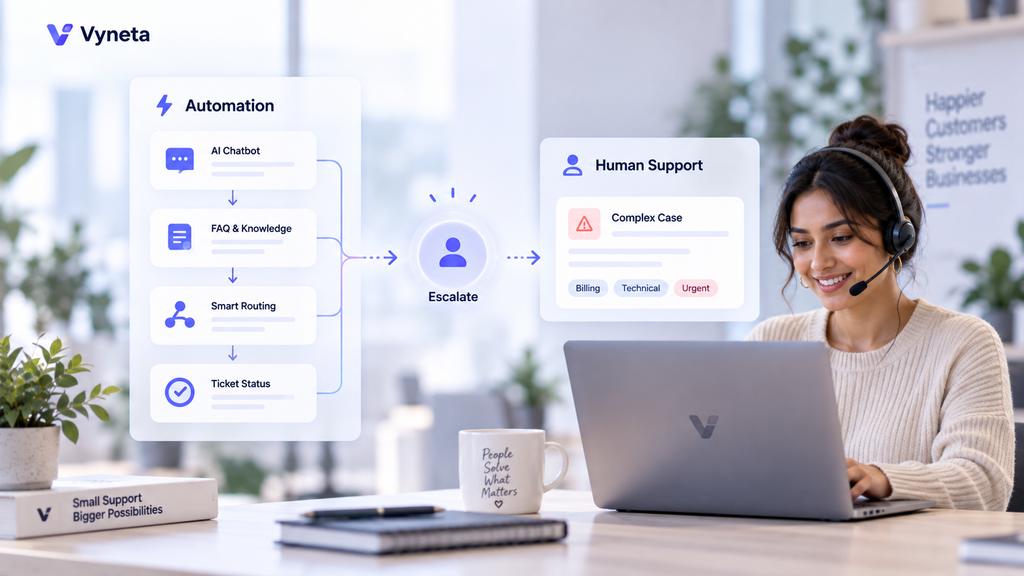
One of the most valuable uses of customer support automation for small businesses is knowing when automation should stop.
A workflow can detect signals that indicate human attention is needed.
That might include certain topics, negative sentiment, repeated failed answers, refund disputes, payment issues, account access problems, or an explicit request to speak with a person.
The automation can then escalate the conversation.
What it should not necessarily do is make the final high-impact decision.
Rules can route the problem.
Humans can evaluate the context.
That distinction helps businesses gain efficiency without giving automation more authority than it should have.
What You Should Not Automate Too Early
Not every support interaction benefits from automation.
Highly emotional conversations, unusual exceptions, disputed transactions, sensitive account issues, complex troubleshooting, and situations where policies are unclear usually deserve human review.
Automating these interactions too aggressively can damage trust.
The same is true for businesses that still do not fully understand their support patterns.
If you have only handled a small number of customer conversations, talking directly with customers may teach you more than automating them immediately.
Manual support creates useful data.
Once recurring patterns become obvious, those patterns become candidates for automation.
A Simple Automation Priority Framework
Before automating a task, evaluate it across four questions.
| Question | Good Candidate for Automation | Keep Human Involved |
|---|---|---|
| Does the task repeat often? | Yes | Rare or unusual |
| Is the correct action predictable? | Usually | Depends heavily on context |
| Is the necessary information reliable? | Clear and current | Missing or ambiguous |
| What happens if the automation is wrong? | Low impact | Financial, sensitive, or high impact |
The best first automation is usually a high-frequency, low-risk task with a predictable outcome.
That is a much safer starting point than choosing the most impressive feature inside your software.
AI Automation vs Traditional Rules
Traditional automation follows predefined logic.
For example:
“If a customer selects Billing, send the conversation to the billing queue.”
AI-based automation can interpret less structured information.
It may recognize that a customer is asking about billing even when they never select a category.
Both approaches have value.
Traditional rules are predictable and easier to audit. AI can handle more variation but may require stronger monitoring and guardrails.
A practical support system often combines both.
Rules handle situations where the workflow is known.
AI assists where language and context vary.
Live Chat, AI, and Automation Should Work Together
Customer support automation is not a replacement for live conversation.
Live chat can still be the best option when a customer needs personal assistance.
AI may be better for repetitive questions.
Automation can connect the two by deciding what happens before, during, and after the conversation.
For example, an AI assistant can answer a common question. If it cannot resolve the issue, the workflow can collect the customer’s details and transfer the conversation to a human agent.
That is more useful than treating live chat and AI as competing technologies.
For a deeper comparison, read Live Chat vs AI Chatbot: Which Is Better for Small Businesses?
Tidio and Gorgias as Automation Examples
The platforms already evaluated by Vyneta show how automation can appear in different support environments.
Tidio combines live chat, shared inbox functionality, automation, and Lyro AI. This type of setup can suit businesses looking for website chat alongside automated and AI-assisted support.
Read our Tidio Review 2026 →.
Gorgias approaches support from a more ecommerce-focused direction, particularly around Shopify workflows and customer conversations connected to store operations.
Read our Gorgias Review 2026 →.
If you are deciding between the two: Tidio vs Gorgias 2026 →
The goal is not to choose the platform with the largest automation feature list.
Choose the platform whose workflows match the work your business actually needs to automate.
How to Introduce Support Automation Safely
Do not automate the entire support system in one weekend.
Choose one repetitive task.
Define what a successful result looks like.
Test the workflow with realistic customer questions.
Review failures.
Improve the source information or routing rules.
Then expand.
This gradual approach makes problems easier to identify and prevents a poorly configured workflow from affecting every customer conversation at once.
It also helps you measure whether automation is genuinely saving time.
Measure Whether Automation Is Actually Helping
Automation is useful only if the outcome improves.
Look beyond the number of automated conversations.
Consider whether response times are improving, customers are reaching the right person faster, repetitive work is decreasing, agents are spending more time on valuable conversations, and incorrect or unnecessary escalations remain low.
Also watch for new friction.
If customers repeatedly ask to bypass the chatbot, a workflow may be standing in their way.
If automated replies create additional follow-up questions, the system may be saving less time than it appears.
The goal is better support with less unnecessary work — not simply more automation.
Customer Support Automation for Small Businesses: A Practical Starting Plan
A lean business does not need dozens of workflows to begin.
Start with a small sequence.
First, document the questions customers ask most often.
Next, automate one or two low-risk answers.
Then add information collection and routing.
Once those workflows are reliable, consider AI assistance or more advanced automation.
Finally, create clear escalation rules so customers can reach a human when automation is no longer appropriate.
This approach keeps customer support automation for small businesses practical, measurable, and easier to maintain.
Final Thoughts
Customer support automation should remove repetitive work without removing good judgment.
Small businesses usually gain the most value by automating predictable tasks first: common questions, routing, information collection, acknowledgements, classification, simple updates, and low-risk follow-ups.
Human support should remain available for situations involving exceptions, emotion, financial consequences, unclear information, or complex decisions.
The best system is not the most automated system.
It is the system that gives customers the right level of help with the least unnecessary friction.
If you are building your support workflow from the beginning, continue with How to Choose Customer Support Software for a Small Online Business.
To understand where AI fits, read AI Customer Support for Small Businesses and Live Chat vs AI Chatbot.
You can also explore Software Reviews, Software Comparisons, and Best Tools.