
Disclosure: This guide contains affiliate links. If you purchase through them, Vyneta may earn a commission at no extra cost to you. Our recommendations are based on product research and hands-on testing where applicable.
AI agents can write emails, answer customer questions, research topics, summarize documents, and automate parts of a business.
But there is a basic problem.
They do not automatically know your business.
They may know general information about marketing, ecommerce, software, or customer support, but they do not necessarily know:
- your products
- your policies
- your pricing
- your processes
- your brand rules
- your previous decisions
- what has recently changed
That is where an AI knowledge base for small business becomes useful.
Instead of repeatedly explaining your business inside every prompt, you give the AI access to an organized set of approved information it can retrieve when completing a task.
The goal is not to feed AI as much information as possible.
The goal is to give it the right information, in a form it can reliably retrieve, and keep that information current.
In this guide, we will explain what an AI knowledge base is, what should go inside one, what should stay out, how to build one step by step, and what we learned from testing a real knowledge-base workflow with Parallel AI.
Table of Contents
Quick Answer: What Is an AI Knowledge Base?
An AI knowledge base is a collection of business information that an AI system can search and use when answering questions or completing tasks.
It may contain:
- website pages
- FAQs
- policies
- product documentation
- internal procedures
- support information
- training material
- business rules
- approved reference documents
Technically, many modern systems use a process known as retrieval-augmented generation, or RAG.
Instead of relying only on what the underlying AI model learned during training, the system retrieves relevant information from your own data and provides that information as context when generating an answer.
AWS describes RAG as a way to retrieve information from data sources and use it to improve the relevance and accuracy of generated responses.
retrieval-augmented generation (RAG)
For a small business, you do not need to understand vector databases or build your own AI infrastructure to benefit from the idea.
Many SaaS platforms handle that technical layer for you.
Your job is to make sure the information they retrieve is actually worth trusting.
Why AI Agents Need Business Knowledge
Imagine asking a general AI chatbot:
“What is our refund policy?”
Unless you already provided that policy, it cannot reliably know the answer.
It might:
- tell you it does not know
- give a generic industry answer
- infer something from incomplete context
- confidently provide the wrong answer
The same problem appears with questions such as:
- “Which plan should I recommend to this customer?”
- “Do we ship to this country?”
- “How should we handle this support issue?”
- “What tone should we use in customer emails?”
- “Which products does the company currently recommend?”
AI becomes much more useful when it can retrieve approved business information before responding.
AWS notes that foundation models often lack awareness of proprietary information, business rules, or recent changes; grounding a model in domain-specific sources helps address that gap.
This does not eliminate AI mistakes.
It simply gives the system a much stronger foundation.
AI Knowledge Base vs Traditional Knowledge Base
A normal knowledge base is designed primarily for humans.
Examples include:
- a help center
- company wiki
- SOP library
- Notion workspace
- documentation website
- Google Drive folder
A human searches through it, opens a page, reads the information, and decides what to do.
An AI knowledge base adds another layer.
The AI can retrieve relevant pieces of information automatically and use them while responding or carrying out a task.
| Traditional knowledge base | AI knowledge base |
|---|---|
| Human searches for information | AI retrieves relevant information |
| User reads documents | AI uses documents as context |
| Mostly keyword/navigation based | Can use semantic retrieval |
| Helps people find answers | Helps people and AI agents find answers |
| Information may remain passive | Information can become part of workflows |
A traditional knowledge base can also become an AI knowledge base if the AI platform can connect to or crawl it.
You do not necessarily need to rebuild everything from scratch.
What Should Go Into an AI Knowledge Base?
Start with information that is both useful and authoritative.
Do not upload everything simply because you can.
1. Core company information
Examples:
- what your business does
- target customers
- positioning
- services or products
- business model
- brand description
This gives the AI basic context about who it is working for.
2. Product and service information
Include information such as:
- current features
- plan differences
- supported use cases
- limitations
- product specifications
- what is included
- what is not included
If this information changes frequently, establish a way to update it.
An old pricing page in a knowledge base can be worse than having no pricing information at all.
3. Customer Support Information
Useful sources include:
- FAQs
- shipping policies
- refund policies
- troubleshooting steps
- escalation rules
- approved support responses
This is particularly useful when AI is involved in customer service.
For more on deciding which support tasks are suitable for AI, see our AI Customer Support for Small Businesses guide.
4. Internal Processes and SOPs
AI agents can also use internal business knowledge.
Examples:
- content publishing process
- lead qualification rules
- onboarding steps
- customer escalation procedures
- research checklists
- reporting processes
- quality-control rules
A useful SOP should be specific enough that someone unfamiliar with the task can understand what happens next.
The same principle helps AI.
5. Brand and Editorial Guidelines
If AI creates content or customer messages, give it rules such as:
- preferred tone
- words to avoid
- formatting conventions
- audience description
- claim restrictions
- fact-checking requirements
- examples of acceptable content
This is more useful than simply saying:
“Write in our brand voice.”
Give the system concrete examples and constraints.
What Should You NOT Put Into an AI Knowledge Base?
Not every business file belongs there.
Avoid blindly adding:
- outdated documents
- duplicate versions
- contradictory policies
- unverified notes
- temporary drafts
- information the agent does not need
- highly sensitive information without appropriate controls
The principle is simple:
Access should follow purpose.
A content-writing agent does not automatically need access to financial records.
A support agent does not automatically need access to every internal document.
More data is not always better.
Cleaner, relevant data is usually more useful.
The Biggest Knowledge-Base Problem: Outdated Information
A knowledge base can look impressive and still produce poor results if its sources are stale.
Suppose your business changes a return policy from 14 days to 30 days.
But your knowledge base contains:
- one page saying 14 days
- another document saying 30 days
- an old FAQ saying “contact support”
The AI now has conflicting evidence.
It may select the wrong source.
This is why knowledge-base maintenance matters just as much as initial setup.
Whenever important business information changes, ask:
- Which source is authoritative?
- Which old sources should be updated or removed?
- Does the AI need to re-crawl or re-sync the information?
- Should we test the relevant questions again?
How to Build an AI Knowledge Base for Small Business
You do not need hundreds of documents to begin.
Start small.
Step 1: Choose One Use Case
Do not begin with:
“We want AI to know everything about our company.”
Start with a specific job.
For example:
Customer support
The agent needs:
- FAQ
- product information
- shipping policy
- return policy
- escalation rules
Or:
Content assistant
It may need:
- brand guidelines
- existing articles
- product information
- editorial rules
- internal linking structure
A narrow use case makes the knowledge base easier to test.
Step 2: Identify Your Authoritative Sources
Make a short list.
For each important topic, decide which source is considered correct.
Example:
| Topic | Authoritative source |
|---|---|
| Pricing | Current pricing page |
| Refunds | Refund policy |
| Product features | Product documentation |
| Brand voice | Editorial guideline |
| Customer FAQs | Current help center |
Avoid feeding the AI five versions of the same answer.
Step 3: Clean the Information
Before importing content:
- remove outdated information
- fix contradictions
- delete obvious duplicates
- add missing headings
- use clear language
- separate unrelated topics
AI retrieval works better when information is understandable and well structured.
You do not need perfect documentation.
You do need documentation that does not fight with itself.
Step 4: Connect or Import the Sources
Depending on the platform, you may be able to:
- crawl a website
- upload documents
- connect cloud storage
- import URLs
- connect another knowledge system
For example, Parallel AI’s current training documentation allows users to add a website through its Knowledge Base using a Website Crawl.
Its documentation recommends configuring crawl depth and explains that syncing the site gives AI agents current information about the business.
Do not assume a crawler imported everything correctly.
Check what actually entered the knowledge base.
That became important during our own testing.
Step 5: Ask Questions You Already Know the Answer To
This is one of the most useful tests.
Ask questions such as:
- What is our refund policy?
- Which customers is this product for?
- What does this page recommend?
- What plans do we offer?
- Which topics have we already published?
Because you already know the correct answer, you can evaluate the AI.
Look for:
- factual accuracy
- missing information
- invented details
- outdated answers
- source confusion
Do not start by asking questions where you do not know what the correct answer should be.
Step 6: Test What the AI Does NOT Know
This test can be even more valuable.
Ask for information you intentionally did not add.
A trustworthy result might say:
“I do not have enough information to verify that.”
A poor result might invent a plausible answer.
NIST describes this type of generative-AI behavior as confabulation: producing erroneous or false information, sometimes confidently.
NIST Generative AI Risk Management Profile
For business use, knowing when the system is uncertain can be as important as knowing when it is correct.
Our free AI Knowledge Base Workbook helps you turn these checks into a repeatable process. Use its source register, answer card and test record to document approved information, define answer boundaries and record how your AI assistant handles missing information.
What We Learned Testing a Real AI Knowledge Base
We tested this directly while evaluating Parallel AI for Vyneta.
Vyneta is a software research and recommendation website, so we used our existing content as business knowledge.
During onboarding, Parallel AI automatically populated its Knowledge Base with several pages from Vyneta, including areas such as:
- Tools
- Reviews
- Comparisons
- Best Tools
We then asked one of its AI employees to analyze the site.
The result was generally useful.
But there was a problem.
Its initial knowledge base did not contain all of Vyneta’s newer guides.
Because the AI could not see those pages, some of its conclusions about our content coverage were incomplete.
This gave us a very practical lesson:
An AI agent can only reason over the information it can actually access.
Updating the Knowledge Base Changed the Answer
We later imported additional Vyneta content, including our guide about live chat and AI chatbots.
Then we tested the agent again.
This time, it correctly identified the newly available information and gave a more complete answer.
More importantly, it also distinguished between:
- content it had full access to
- other guides it could see referenced
- information it still could not fully verify
That behavior was more valuable than simply producing a confident response.
You can see the complete hands-on test, screenshots, pricing, strengths, and limitations in our Parallel AI Review 2026.
What Our Test Also Revealed
A knowledge base does not fix every AI problem.
During another test, Parallel AI’s Content Engine generated a polished long-form article but included numerical claims without reliable sources.
That means there are two different questions:
Does the AI have access to your business knowledge?
and
Is every statement the AI generates reliable?
Those are not the same thing.
Grounding improves context.
Human verification is still necessary.
AI Knowledge Base and AI Employees Work Together
An AI employee without business context may be little more than a general chatbot with a job title.
The knowledge base changes that.
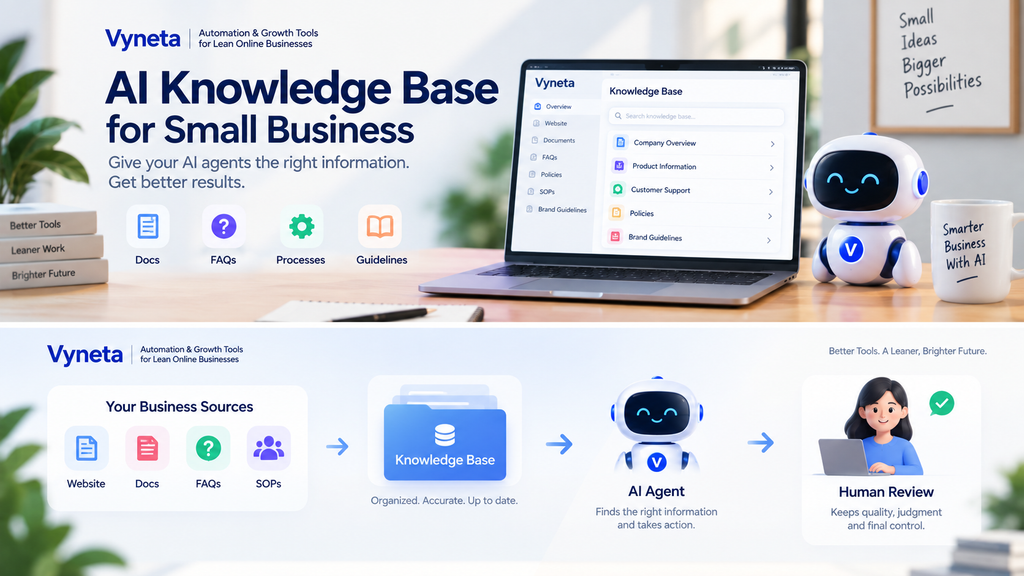
A useful structure looks more like this:
Business knowledge → AI agent → tools → action → human review
For example:
Customer support agent
Knowledge:
- product documentation
- FAQs
- policies
Tools:
- support inbox
- CRM
Actions:
- answer simple questions
- summarize tickets
- prepare responses
Human:
- handles exceptions
- approves unusual actions
We explain the wider AI-employee model in our AI Employees for Small Business guide.
AI Knowledge Base for Customer Support
Customer support is one of the easiest places to understand the benefit.
Without a knowledge base:
Customer asks:
“Can I return this after 25 days?”
The AI may rely on generic assumptions.
With a reliable business knowledge base:
The agent can retrieve your actual return policy before answering.
This makes knowledge management part of customer-support automation.
But do not give an AI agent unlimited authority simply because its answers improve.
A sensible progression is:
Step 1: retrieve information
Step 2: draft responses
Step 3: answer low-risk FAQs
Step 4: automate more only after testing reliability
For a practical breakdown of automation opportunities, see Customer Support Automation for Small Businesses.
How Often Should You Update an AI Knowledge Base?
There is no universal schedule.
Update based on how often the underlying information changes.
High-priority information may include:
- pricing
- policies
- product features
- availability
- operating procedures
- compliance requirements
These should be updated whenever the source changes.
More stable information such as company history may require much less maintenance.
For a small business, a simple monthly review is often more practical than building a complicated knowledge-governance system immediately.
Ask:
- What changed this month?
- Which old pages are wrong?
- Which common questions still fail?
- Which answers required human correction?
Use failures as signals for what the knowledge base needs next.
How Much Content Do You Need to Start?
Less than you probably think.
You do not need 500 documents.
A small business can start with:
- company overview
- key product/service information
- current policies
- common FAQs
- one or two important processes
- relevant brand guidelines
Then test.
If the AI cannot answer an important question, decide whether the missing information belongs in the knowledge base.
Build from real gaps rather than trying to predict every possible question.
Common AI Knowledge Base Mistakes
1. Uploading everything
More documents can create more conflicting information.
Start with relevant sources.
2. Leaving outdated pages active
Old information may still be retrieved.
3. Assuming the crawler found everything
Check the imported pages.
Our Parallel AI test showed why this matters.
4. Testing only easy questions
You also need edge cases and questions the system should refuse to answer.
5. Forgetting permissions
Different agents may need different information.
6. Treating AI output as verified truth
Knowledge grounding reduces one problem.
It does not eliminate generative-AI errors.
A Simple AI Knowledge Base Checklist
Before putting an AI agent into a real workflow, verify:
- Is the information current?
- Is there one authoritative source for important facts?
- Have duplicate documents been removed?
- Are policies clearly written?
- Did the system actually import the required pages?
- Can the AI answer known questions correctly?
- Does it admit when information is missing?
- Are sensitive sources access-controlled?
- Is there a human escalation path?
- Is someone responsible for keeping the information current?
You do not need a complicated governance department.
For a small team, ownership is more important than bureaucracy.
Someone simply needs to know:
“When this information changes, this knowledge source must also change.”
Should a Small Business Build or Buy an AI Knowledge Base?
For most small businesses, buying an existing SaaS platform is the practical starting point.
Building your own RAG infrastructure can involve:
- data ingestion
- document processing
- embeddings
- retrieval
- vector storage
- access controls
- model integration
- monitoring
Managed services exist specifically to reduce that technical work; AWS, for example, provides managed knowledge-base capabilities rather than requiring every organization to build the retrieval pipeline from scratch.
A custom system can make sense when:
- you have unusual data sources
- security architecture requires it
- you need deep customization
- the economics justify development
But a solopreneur or small online business usually has more important problems to solve first.
Start by proving the workflow is useful.
Then increase technical sophistication if the results justify it.
Is an AI Knowledge Base Worth It for a Small Business?
It can be, particularly when people or AI systems repeatedly need the same information.
The clearest opportunities appear when:
- answers are scattered across documents
- the same questions keep returning
- AI is already being used for support or content
- employees repeatedly search for procedures
- an AI agent needs reliable business context
But the value does not come from calling something a “knowledge base.”
It comes from improving this chain:
reliable information → reliable retrieval → useful AI response → appropriate human review
If the information entering that chain is poor, automation simply moves the problem faster.
Final Takeaway
An AI knowledge base for small business does not need to be enormous.
It needs to be accurate, relevant, organized, and maintained.
Start with one workflow.
Give the AI a small set of authoritative sources.
Ask questions you already know the answers to.
Test what happens when information is missing.
Then expand only when the results justify it.
Our hands-on testing with Parallel AI reinforced the same lesson:
Better AI starts with better context.
If you want to see how an AI employee platform actually used a website knowledge base in our testing, read our hands-on Parallel AI Review 2026.
Frequently Asked Questions
What is an AI knowledge base?
An AI knowledge base is a collection of approved information that an AI system can retrieve and use when answering questions or completing tasks.
What is RAG?
RAG stands for retrieval-augmented generation. It allows an AI system to retrieve relevant external information and use it as context when generating a response.
Do I need to train my own AI model?
Usually not. Many modern AI platforms can work with websites, documents, or connected knowledge sources without requiring a small business to train its own model.
What should I put in an AI knowledge base?
Start with authoritative company information, product or service details, policies, FAQs, important procedures, and relevant business rules.
Can an AI knowledge base stop hallucinations?
No. Better grounding can improve relevance and factual context, but generative AI can still produce incorrect or unsupported information. Important outputs should still be reviewed.
How often should I update an AI knowledge base?
Update important information whenever the underlying source changes. Pricing, policies, products, and operational procedures usually deserve the highest priority.
Is an AI knowledge base useful for solopreneurs?
Yes, particularly when the same business context is repeatedly needed for customer support, content, research, or recurring workflows.