
Affiliate Disclosure: This review contains affiliate links. If you sign up through one of these links, Vyneta may earn a commission at no extra cost to you. This does not affect our editorial conclusions.
Website analytics tools often create a strange problem: they collect more data than most small teams know what to do with.
Page Pulse takes the opposite approach.
Instead of trying to become another massive analytics platform, it focuses on a simpler question: what is happening on your website, and what should you pay attention to next?
For this Page Pulse review, we created a free account, added Vyneta as a website, explored the onboarding and dashboard, and tested its AI Insights directly.
The experience was refreshingly simple.
But our testing also uncovered an important limitation: AI-generated recommendations still need human verification, especially before enough tracking data exists.
That distinction matters.
Page Pulse looks promising for founders, marketers, content publishers, and lean teams that want understandable website analytics without spending hours inside reporting tools. However, we have not independently tested its live tracking accuracy, advanced event analysis, or full reporting capabilities.
Here is what we found.
Table of Contents
Page Pulse Review: The Short Version
Page Pulse is a lightweight website analytics platform built around simple dashboards, conversion tracking, traffic sources, click tracking, heatmaps, collaboration, and AI-powered insights.
Its strongest advantage is accessibility.
The interface is much easier to understand than a traditional enterprise analytics platform, and the free plan lets you try the product without entering a credit card. Page Pulse currently says its tracking does not use traffic-based pricing, although usage remains subject to its fair-use policy.
An important pricing detail is how Page Pulse defines a monitored “page.”
According to clarification provided directly by the Page Pulse team, a monitored page can represent an entire website rather than an individual article or internal URL. The company says that installing its tracking script across a website allows activity from that site’s internal pages to be collected.
This means the plan’s page allowance should not automatically be interpreted as a limit on the number of articles or URLs that can be tracked within a website.
We have not independently tested the site-wide tracking implementation, so the exact scope of URL-level reporting and behavioral analytics remains outside this review’s hands-on findings.
Our other concern is AI interpretation.
During testing, Page Pulse generated useful recommendations about Vyneta, but it initially treated the lack of recorded tracking data too much like actual performance data. When challenged, the AI became much more transparent about which statements came from observed information and which were assumptions.
That made the feature more useful, but it also reinforced an important lesson: AI-generated analytics recommendations should be checked against the data actually available.
Best for: founders, solopreneurs, marketers, agencies, and small teams looking for straightforward website analytics with AI-assisted interpretation.
Less suitable for: teams that require highly customized analytics, advanced event modeling, or extensive reporting capabilities that we have not verified in Page Pulse.
What Is Page Pulse?
Page Pulse is a website analytics platform designed to make traffic and conversion data easier to understand.
Its current product offering includes visitor analytics, conversions, traffic channels, click tracking, heatmaps and AI Insights. The company also promotes team collaboration features and support for managing multiple websites from one workspace.
The positioning is deliberately different from analytics platforms designed for data specialists.
Instead of presenting dozens of reports and configuration options, Page Pulse attempts to surface a smaller set of metrics and then help users interpret them.
Setup starts by adding a website and installing a tracking snippet. Page Pulse says the same tracking layer can then collect the data required for analytics and supported behavioral features.
For a lean online business, that approach makes sense.
The real question is whether the simplicity removes unnecessary complexity—or removes information you will eventually need.
How We Tested Page Pulse
For this review, we created a free Page Pulse account and added Vyneta.com, our own software review and affiliate website.
We went through the onboarding flow, inspected the WordPress installation instructions, opened the analytics dashboard and tested the built-in AI Insights feature.
We deliberately did not install the Page Pulse tracking script on our production WordPress site during this initial review.
That means we could evaluate the product interface, onboarding process, AI interaction and account structure, but we did not independently verify long-term visitor tracking accuracy, conversion attribution or heatmap accuracy.
That limitation is important.
We would rather tell you exactly what we tested than imply that every feature received a full production deployment.
Getting Started With Page Pulse
The onboarding experience was straightforward.
After creating the account, Page Pulse asked us which website we wanted to track and how many websites we planned to monitor.
Once we entered Vyneta, Page Pulse correctly detected WordPress and presented platform-specific installation instructions.
The instructions suggested installing the tracking snippet before the closing body tag and also offered WordPress guidance for adding the script.
This is useful for non-technical users because you do not have to start by figuring out how the tracking architecture works.
However, adding any third-party tracking script to a live site should still be treated as a technical decision rather than an automatic onboarding step.
For this review, we skipped installation and continued into the dashboard.
That turned out to be useful because it allowed us to see what Page Pulse could—and could not—tell us without real analytics data.
The Dashboard Is Clean and Easy to Understand
Page Pulse’s dashboard is one of the product’s strongest features.
Instead of presenting a dense reporting interface, it surfaces familiar metrics such as visitors, page views, conversions, conversion rate and time on page.
The visual hierarchy is clear and requires very little explanation.
For someone who finds traditional analytics dashboards intimidating, that simplicity is genuinely useful.
There is also an important downside.
Simple dashboards work best when the metrics shown are exactly the metrics you need. More advanced teams may eventually want segmentation, deeper event analysis, custom exploration or a more flexible data model.
Page Pulse does not appear to be trying to win that battle.
Its value proposition is closer to faster understanding, not maximum analytical depth.
Page Pulse AI Insights: The Most Interesting Feature We Tested
AI Insights was the part of Page Pulse we wanted to test most carefully.
Our free account showed an allowance of 15 AI Insights credits, which also matches the current Free plan shown by Page Pulse.
The interface offered prompts such as performance summaries, improvement recommendations, traffic insights, bounce-rate analysis and comparisons.
We asked:
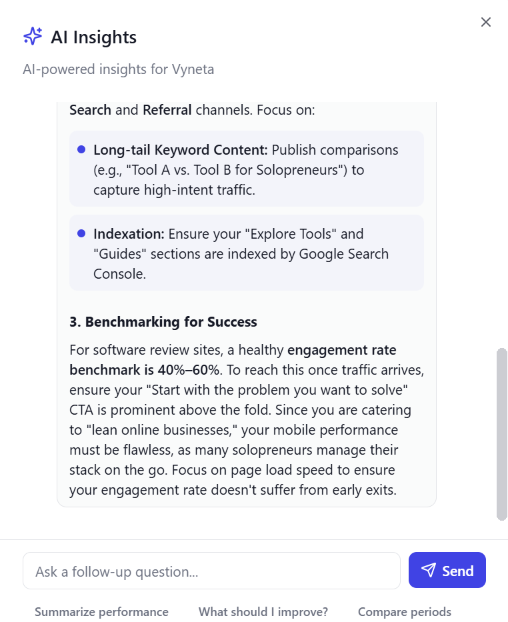
“What should I improve?”
Page Pulse responded with several recommendations related to Vyneta.
It correctly recognized that the site targets people looking for software and tools, suggested creating long-tail comparison content, mentioned indexation, and made recommendations around site performance and calls to action.
Some of those suggestions were useful.
But there was a problem.
Page Pulse also referred to zero visitors and zero engagement in a way that could be interpreted as actual website performance.
We had not installed the Page Pulse tracking script.
Therefore, Page Pulse did not know that Vyneta had zero real visitors. It only knew that Page Pulse had recorded no visitor data.
Those are not the same thing.
That prompted a second test.
Can Page Pulse Separate Facts From Assumptions?
We asked the AI:
“Based only on the data you can actually see for Vyneta, which insights are measured data and which are assumptions or general recommendations?”
The response improved considerably.
Page Pulse separated its answer into measured information and assumptions.
It acknowledged that comments about tracking problems, industry engagement benchmarks, SEO competitiveness and traffic-acquisition strategy were assumptions or general recommendations rather than direct measurements of Vyneta.
That was a positive result.
It shows that the AI can reason more carefully when explicitly asked to explain the basis for its conclusions.
However, we still found the wording around zero traffic imperfect.
Without an installed tracking script, the most defensible statement is not:
“The website has zero visitors.”
It is:
“Page Pulse has recorded zero visitors.”
That distinction may sound minor, but it matters when an AI system is helping someone make business decisions.

Our Take on Page Pulse AI Insights
AI Insights is useful—but we would not use it passively.
The feature becomes more valuable when you ask follow-up questions and challenge the reasoning behind recommendations.
That is actually a good workflow for any AI-powered analytics product.
Ask for the recommendation.
Then ask:
What data supports this conclusion?
The second question may be more valuable than the first.
Page Pulse’s own legal terms also acknowledge that AI-generated output may not always be accurate or complete and that users are responsible for reviewing it before relying on it. The terms state that certain information used by AI features—including prompts, page URLs and analytics context—may be sent to third-party AI model providers for processing.
That does not make AI Insights a bad feature.
It simply means it should be treated as decision support rather than automated truth.
Page Pulse Features
Page Pulse currently centers the product around six core analytics areas plus AI and heatmap functionality.
The visitor and traffic views are designed to explain how people arrive and engage. Conversion tracking focuses on important actions. Click tracking helps identify which links and calls to action users interact with. Heatmaps add a visual behavioral layer, while AI Insights attempts to translate the resulting data into recommendations.
There are also collaboration features for inviting other people and discussing performance inside the platform.
The combination is interesting because Page Pulse is not simply competing with traditional traffic analytics.
It is trying to combine:
analytics + behavioral insight + interpretation.
That is likely to be the product’s strongest differentiation if the AI layer continues improving.
Page Pulse Pricing in 2026
Page Pulse currently offers five pricing levels. Pricing and features can change, so always verify the current plan before purchasing.
| Plan | Monthly Price | Tracked Pages | Data Retention | AI Insights | Selected Features |
|---|---|---|---|---|---|
| Free | $0 | 1 | 14 days | 15/month | Basic analytics |
| Starter | $29 | 2 | 90 days | 100/month | Real-time analytics, conversion tracking |
| Growth | $79 | 5 | 1 year | 250/month | 2 heatmaps, event conversions, comments |
| Pro | $129 | 10 | 3 years | 750/month | 5 heatmaps, cross-domain conversions |
| Scale | $199 | 20 | — | 1,500/month | 15 heatmaps and higher-scale usage |
Page Pulse currently advertises traffic-inclusive pricing rather than charging directly for every visitor, although usage remains subject to its fair-use policy.
An important clarification about tracked pages: The Page Pulse team has explained that a monitored “page” can represent an entire website, not necessarily one individual article or internal URL.
According to the company, installing its tracking script across a website allows activity from that site’s internal pages to be collected under the website’s monitoring setup.
This means a plan offering two monitored pages should not automatically be interpreted as allowing tracking for only two articles or internal URLs.
We have not independently tested the site-wide tracking implementation or verified the full scope of URL-level reporting. Readers managing multiple websites or landing pages should confirm how their specific setup counts against the plan allowance before upgrading.
Traffic allowances, data retention, AI Insights credits, and access to advanced features are also important factors when comparing plans.
What Does a Monitored “Page” Mean in Page Pulse?
One pricing detail deserves clarification before choosing a Page Pulse plan: what the company means by a monitored “page.”
The pricing table lists allowances such as two pages for Starter, five for Growth, and ten for Pro.
At first glance, that could suggest each individual article or internal URL consumes one of those allowances. However, the Page Pulse team clarified directly to Vyneta that a monitored “page” can represent an entire website, not just a single article.
According to the company, installing the tracking script across a website allows activity from its internal pages to be collected under that site’s monitoring setup.
For example, a website containing 100 blog posts should not automatically be treated as requiring 100 separate monitored-page allowances.
This distinction matters for publishers, affiliate websites, and businesses managing multiple landing pages.
It also changes how the pricing should be evaluated.
Rather than simply counting every article or internal URL, prospective customers should confirm how Page Pulse defines each monitored website or landing-page setup, and which features are included at their chosen tier.
What we have not verified: During this review, we did not install the tracking script on our live website. Therefore, we cannot independently confirm the full scope of internal-URL reporting, conversion attribution, or heatmap coverage under a single monitored website.
The practical takeaway is straightforward: do not assume the advertised page allowance equals the number of articles you can track. Confirm how your specific setup is counted before upgrading.
Page Pulse Pros and Cons
Based on our hands-on evaluation and the company’s current product information:
Pros: Clean and approachable interface; free plan without a credit card requirement; straightforward onboarding; AI Insights that can generate useful recommendations; pricing that is not directly tied to visitor volume, subject to the fair-use policy; and a combination of website analytics, conversion tracking, and behavioral tools.
Cons: Some advanced features require paid plans; AI-generated recommendations can blur the distinction between recorded data and assumptions; advanced analytics teams may need more customization; and we have not independently verified tracking accuracy, conversion attribution, or heatmap performance on a live website.
Important pricing clarification: Page Pulse has confirmed that a monitored “page” can represent an entire website rather than one individual article or internal URL. The plan allowance should not automatically be interpreted as a limit on the number of articles a website can track.
Who Is Page Pulse Best For?
Page Pulse may be a good fit for founders, solopreneurs, marketers, and small teams that want a more approachable way to understand website activity without building complicated analytics reports.
It may be particularly useful for:
- Small business owners who want a straightforward overview of website performance.
- Content publishers and affiliate websites interested in understanding visitor behavior and exploring AI-assisted recommendations.
- Marketers and agencies managing websites or landing pages and looking for accessible performance insights.
- Teams exploring AI-assisted analytics that want to evaluate recommendations alongside their existing reporting tools.
According to the Page Pulse team, one monitored “page” can represent an entire website, including activity across its internal URLs. Therefore, having many blog posts does not automatically make a website unsuitable for Page Pulse.
However, we have not independently verified site-wide tracking or the full scope of reporting available under each plan.
Who Should Probably Skip Page Pulse?
Page Pulse may be less suitable for teams that need highly customized analytics or want to replace an established measurement system without first validating the new tool.
Consider other options, or run a careful trial, if:
- You need advanced event-level analysis with complex custom dimensions, attribution models, or reporting requirements.
- You require independently verified tracking accuracy before using analytics data for important business decisions.
- You expect AI-generated recommendations to be consistently reliable without reviewing the underlying data.
- You cannot install or evaluate the tracking script due to technical, privacy, or organizational constraints.
These are evaluation considerations rather than confirmed product deficiencies. Our hands-on testing did not include a live tracking deployment, so we cannot make definitive claims about Page Pulse’s tracking accuracy or advanced analytics capabilities.
Page Pulse vs Google Analytics
Page Pulse positions itself as a simpler alternative to GA4.
We would frame the comparison slightly differently.
You do not necessarily need to choose one forever.
GA4 is a broad analytics ecosystem with much deeper configuration and reporting possibilities.
Page Pulse focuses on making a smaller set of website and conversion signals easier to understand.
If you are a solopreneur and mainly want answers such as:
Where are visitors coming from?
Which page is converting?
What are visitors clicking?
What should I investigate next?
Page Pulse may feel dramatically more approachable.
If you need complex measurement architecture, advanced event analysis or deeply customized reporting, GA4 and more specialized tools remain much harder to replace.
Page Pulse itself says the products can operate alongside each other, which is a more sensible way to evaluate the tool than assuming every new analytics platform needs to completely replace Google Analytics.
What We Like Most About Page Pulse
Our favorite part of Page Pulse is not any single chart.
It is the direction of the product.
Website analytics has spent years becoming more powerful, but power does not automatically translate into better decisions.
Page Pulse is trying to shorten the distance between:
data → interpretation → action.
The AI Insights feature illustrates both the opportunity and the risk.
When it worked well, it turned information about Vyneta into understandable recommendations almost immediately.
When it overreached, it reminded us why AI-generated analytics still needs human judgment.
That makes Page Pulse interesting.
It is not simply hiding complicated analytics behind prettier charts.
It is attempting to help users interpret what the numbers mean.
The Biggest Limitation
The biggest limitation of this review is the scope of our hands-on testing.
We explored Page Pulse’s onboarding, dashboard, and AI Insights using a free account, but we did not install the tracking script on a live website.
That distinction matters. Without live tracking data, we cannot independently assess the accuracy of visitor analytics, conversion attribution, heatmaps, or the full reporting experience.
We also initially misunderstood the meaning of a monitored “page” in Page Pulse’s pricing. The company subsequently clarified that a monitored page can represent an entire website rather than one individual article or internal URL.
We have corrected our pricing analysis accordingly. However, the exact scope of site-wide reporting remains unverified in our own testing.
For anyone considering Page Pulse, our recommendation is to evaluate it using real website data before making an important purchasing or analytics decision.
Is Page Pulse Worth It?
Page Pulse is worth considering if you want an approachable website analytics tool with AI-assisted insights and a relatively straightforward interface.
During our free-account evaluation, we found the onboarding process accessible and explored how AI Insights presents recommendations. However, we did not deploy the tracking script on a live website, so we cannot independently judge the accuracy of its visitor tracking, conversion attribution, or behavioral analytics.
One important pricing clarification also changes our earlier assessment. According to the Page Pulse team, a monitored “page” can represent an entire website rather than an individual article or internal URL. Websites with many blog posts should therefore not automatically be considered unsuitable based on the advertised page allowances.
That clarification is useful, but it does not replace hands-on validation of site-wide tracking or URL-level reporting.
Our recommendation is to start with the available free plan, verify how your website is counted, and test the analytics features that matter to your business before upgrading.
Page Pulse shows promise for smaller teams seeking accessible analytics, but our limited testing does not support a definitive verdict on its full tracking capabilities.
Final Verdict: A Promising Analytics Tool for Lean Teams
Page Pulse offers an accessible approach to website analytics, combining a relatively simple dashboard with AI-generated insights and additional behavioral analytics features.
Our hands-on evaluation covered the free-account onboarding experience, dashboard, and AI Insights. We found the interface approachable, while also observing that AI recommendations need to be interpreted carefully when underlying tracking data is missing.
We have also corrected an earlier misunderstanding in this review about the meaning of monitored “pages.” The Page Pulse team clarified that a monitored page can represent an entire website rather than a single article or internal URL. This means websites with many content pages should not automatically be ruled out based on the advertised page allowances.
However, we have not independently tested Page Pulse with its tracking script installed on a live website. We therefore cannot verify its tracking accuracy, conversion attribution, heatmap performance, or complete URL-level reporting.
Our verdict: Page Pulse is worth evaluating if you want straightforward website analytics with AI-assisted interpretation. Start with the free plan, validate the features that matter to your business, and make an upgrade decision based on your own tracking results rather than AI-generated recommendations alone.
No credit card is currently required for the Free plan. Always check the latest pricing and plan limits before upgrading.